For decades, professional creative software has been dominated by a relatively small number of companies controlling the tools, file formats, workflows, and subscriptions upon which millions of creators depend.
Adobe Photoshop, Illustrator, Premiere Pro, After Effects, Lightroom, Acrobat, and InDesign have become more than applications. They are institutions. Entire professions have built their working habits around them.
Now, an ambitious open-source initiative called ArtCraft is attempting something extraordinary: rebuilding an interconnected family of professional creative applications from scratch, using the Rust programming language, AI-assisted development, and an architecture designed for both human creators and autonomous AI agents.

The applications are free, their source code is publicly available, and the project aims to reproduce familiar professional workflows without requiring users to surrender control of their tools or their files.
But ArtCraft is interesting for reasons that extend far beyond the promise of free Photoshop alternatives.
It raises three fundamental questions about the future of software engineering:
- Can artificial intelligence dramatically reduce the cost of developing sophisticated desktop applications?
- Can modern systems programming deliver meaningful performance improvements over established creative software?
- And could AI-assisted open-source development disrupt the very software industry that has invested so aggressively in commercial artificial intelligence?
There is something wonderfully ironic about that final possibility.
The industry spent years explaining how AI would transform the work of artists. Now AI might help independent developers challenge the software companies those artists depend on.
The story, however, is more complicated than the headlines suggest.
1. What exactly is ArtCraft?
A complete creative software ecosystem, not merely a collection of clones.
The official ArtCraft application catalog presents seven principal applications, covering almost the entire traditional creative production pipeline.
| Application | Primary purpose | Familiar commercial counterpart |
|---|---|---|
| PhotoCraft | Raster image editing | Adobe Photoshop |
| VectorCraft | Vector illustration | Adobe Illustrator |
| FilmCraft | Video editing | Adobe Premiere Pro |
| LightCraft | RAW photography and catalog management | Adobe Lightroom |
| PdfCraft | PDF viewing and manipulation | Adobe Acrobat |
| EffectCraft | Motion graphics and visual effects | Adobe After Effects |
| DesignCraft | Page layout and publishing | Adobe InDesign |
These comparisons describe the intended use cases, not proven feature equivalence. Most applications remain in alpha or active development, despite the existence of downloadable builds.
The project’s design principles are unusually consistent: native software, permissive open-source licensing, local processing, familiar interfaces, cross-platform support, and programmatic control through command-line tools and AI-agent interfaces.
ArtCraft also provides a launcher for installing and updating the applications together.
Rather than building another creative web service that happens to resemble a desktop application, the project is attempting to deliver native tools with their own rendering engines, document models, and file-handling capabilities.
2. Who is behind ArtCraft?
The public-facing development organization is ArtCraft on GitHub, operating under the storytold account. Its repositories cover the creative applications, shared infrastructure, launcher, and related software.
The ArtCraft website also lists the contact address hello@storyteller.ai, providing a connection to the Storyteller identity. However, that contact alone does not establish the complete legal ownership or staffing structure.
One especially important detail emerged in reporting published on October 8, 2026.
Tom’s Hardware described a Reddit developer using the handle u/ai_art_is_art who reported rebuilding Adobe-style creative applications in Rust with assistance from Anthropic’s Claude.
The coverage characterized the undertaking as the work of a solo developer, while highlighting substantial skepticism surrounding the scale of the project and its unusually rapid development.
This creates an important distinction between the project’s public identity and what can be independently established.
ArtCraft presents itself as a team and community. External reporting describes an individual driving the recent wave of development. Its public repositories also invite contributions.
These descriptions need not be mutually exclusive. A project may have a principal developer, a wider organization, and an emerging contributor community.
Nevertheless, the exact size of the dedicated engineering team, individual responsibilities, funding arrangements, and extent of independent human code review are not conclusively established by the sources examined.
That uncertainty matters when evaluating a software suite whose potential target audience includes professional designers, studios, and businesses handling valuable client documents.
A credible open-source project can begin with one exceptionally productive developer. Sustaining seven complex applications is another challenge entirely.
3. The development process: AI-assisted engineering at industrial scale
On October 3, 2026, the developer behind the Reddit account u/ai_art_is_art publicly described using large language models to help recreate seven major Adobe applications in native Rust. The announcement linked directly to the storytold repositories and invited the community to test, fork, and contribute to the software.
What makes this case interesting is not simply that AI generated code. AI-assisted development has already become commonplace.
The unusual part is the ambition: using AI to accelerate the construction of multiple sophisticated desktop applications simultaneously, including components normally associated with years of specialized engineering.
A professional image editor requires substantially more than menus and buttons. It needs color management, compositing, brush engines, document serialization, font shaping, memory management, GPU acceleration, and reliable handling of malformed files.
Similarly, a video editor must address media decoding, timing accuracy, multitrack playback, audio synchronization, caching, effects, hardware acceleration, and export reliability.
Each problem can be an engineering discipline in its own right.
3.1 The architecture behind PhotoCraft
PhotoCraft provides one of the clearest publicly documented examples of how the project is constructed.
Its architecture separates the document model and editing engine from the interface. The same operations can therefore be invoked through multiple control mechanisms.
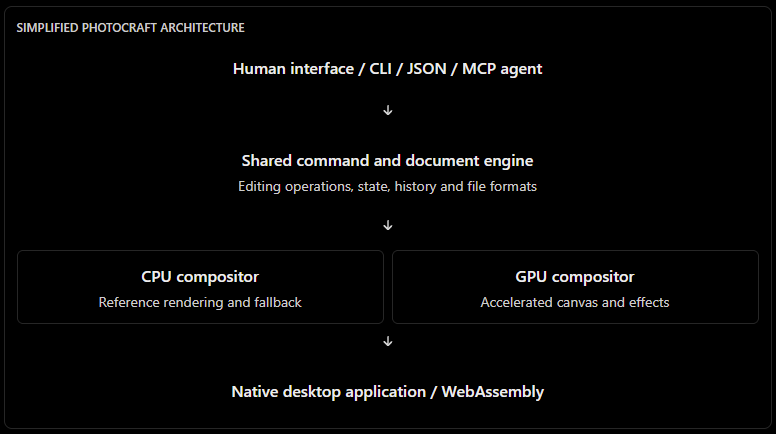
The repository documents several important implementation decisions:
- An
egui-based interface on top of a separate editing engine. - GPU compositing using
wgpu. - A CPU reference renderer against which GPU results can be compared.
- Sparse, copy-on-write image tiles measuring 256 × 256 pixels.
- Parallelized image-processing operations.
- Compatibility testing for PSD documents.
- Unit tests, property-based tests, fuzzing, and performance budgets.
The goal is to keep the editing engine independent from the way an operation is requested. That is a significant architectural advantage for automation.
3.2 AI agents are part of the design, not an accessory
This is arguably the project’s most consequential feature.
Traditional creative software is built principally around human interaction: selecting tools, moving objects, adjusting sliders, and navigating dialog boxes.
ArtCraft aims to expose the same capabilities programmatically through command-line interfaces, JSON control channels, and Model Context Protocol (MCP) servers.
For example, an automated workflow could theoretically:
- Open a product photograph.
- Apply a predefined color adjustment.
- Generate a selection or mask.
- Resize the image for an e-commerce catalog.
- Export WebP and JPEG versions.
- Report errors to an orchestration system.
Instead of an agent trying to click through a graphical interface, it could invoke structured commands.

This matters for large-scale creative production, product catalog automation, content management, and integration with enterprise systems.
For an e-commerce business operating Magento, for example, a mature agent-driven image editor could become part of an automated asset-production pipeline.
The ambition is not simply to replace mouse clicks. It is to make professional creative operations directly accessible to other software.
4. The applications: What can they actually do?
PhotoCraft — Raster editing
Layers, masks, adjustment layers, brushes, typography, smart objects, GPU compositing, and PSD/PSB file support. The project advertises 16 adjustment layers, more than 70 filters, and editing at 8-, 16-, and 32-bit depths with several color models.
VectorCraft — Illustration
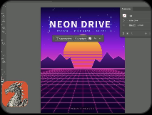
Bézier editing, Boolean shape operations, gradients, editable effects, image tracing, and SVG/PDF interoperability. The developers claim approximately 27 ms to render 20,000 shapes at Retina resolution.
FilmCraft — Video production
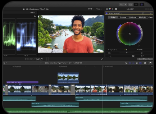
Multitrack editing, source and program monitors, trimming, keyframes, color grading, HDR workflows, audio processing, and advertised native media codecs. It claims approximately 55 video effects and 30 transitions.
LightCraft — Photography
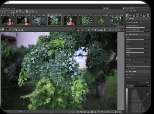
Non-destructive RAW processing, camera-format decoding, selective masks, curves, color wheels, and catalog management. Its most striking advertised performance figure is approximately 4 ms for a GPU processing update on a 24-megapixel RAW image.

PdfCraft — PDF manipulation
Document viewing, search, page organization, splitting, merging, and security tools. The project reports zero crashes across a specified 983-document rendering test corpus. This is a stability claim, not a universal guarantee.

EffectCraft — Motion graphics
Compositions, animated layers, keyframes, expressions, cameras, lights, and rendering. The project advertises 259 effects and 38 blending modes.
DesignCraft — Publishing
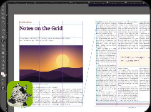
Multi-page layouts, master/parent pages, linked text frames, typographic composition, color swatches, and print-oriented PDF export, including claimed CMYK and spot-color support.
The important word throughout this overview is advertised.
A menu item being present does not necessarily mean an entire professional workflow is reliable. Likewise, successful handling of sample documents does not automatically demonstrate compatibility with the enormous variety of real production files.
These features deserve testing against the actual needs of designers, photographers, publishers, and filmmakers.
5. The Rust question: Are these applications genuinely faster?
Rust is a modern systems programming language designed to provide high performance, fine-grained resource control, and strong memory-safety guarantees without requiring a garbage-collected runtime.
Its ownership and borrowing rules eliminate several common classes of memory-management errors in safe Rust code, including many use-after-free errors and data races.
A Rust program can compile to native machine code and use multiple processor cores, SIMD instructions, and hardware acceleration.
That makes it an attractive choice for computationally demanding applications.
But there is a distinction between Rust being capable of high performance and an application being faster because it was written in Rust.
Modern Adobe applications also use highly optimized native code, GPU processing, platform-specific libraries, and decades of performance engineering.
A Rust implementation can outperform some of those systems, but it cannot be assumed to do so merely because the language is newer.
5.1 What the ArtCraft project claims
VectorCraft rendering 27 ms 20,000 shapes at Retina resolution
LightCraft GPU update 4 ms Reported 24 MP RAW adjustment
PhotoCraft PSD test 134/135 Website-reported round trips
PdfCraft corpus 983 Files in advertised crash test
Developer-published metrics, not independently reproduced comparative benchmarks. The PSD and PDF figures concern compatibility/reliability rather than execution speed.
The reported GPU update and vector rendering times are promising, but they have important limitations.
A 4 ms slider update is not the same as decoding an entire RAW file in 4 ms. Nor is rendering 20,000 simple shapes equivalent to rendering 20,000 complex objects with clipping, filters, transparency, and typography.
Likewise, a claimed 120 fps interface refresh does not mean every editing operation completes within 8.33 ms.
Without identical workloads, hardware, document complexity, build configurations, and measurement methodologies, direct claims of superiority over Photoshop, Illustrator, or Lightroom would be premature.
5.2 A more revealing source: PhotoCraft’s own benchmark scorecard
Fortunately, PhotoCraft publishes something more useful than promotional figures: a performance scorecard within its GitHub repository.
The PhotoCraft performance scorecard contains actual reported timings, memory consumption, performance targets, and whether those targets were met.
The baseline dated October 5, 2026 identifies the test hardware as an Apple M4 Pro system with 48 GB RAM, running macOS 15.6.
Consider the following results:
| Tested operation | Target p95 | Recorded p95 | Assessment |
|---|---|---|---|
| Move layer with styles | 25 ms | 535 ms | Over budget |
| Change layer opacity | 20 ms | 443 ms | Over budget |
| Change layer fill | 20 ms | 467 ms | Over budget |
| Change blend mode | 20 ms | 423 ms | Over budget |
Source: PhotoCraft scorecard, October 11, 2026. The benchmark baseline is dated October 5. These are internal results, not Adobe comparisons.
The difference is substantial.
For example, changing layer opacity recorded a 443 ms 95th-percentile latency against a 20 ms target. That is approximately 22 times the stated budget.
The scorecard also indicates: 3 scenarios within budget, out of 56 tracked performance scenarios.
The project categorizes 22 scenarios as over budget or failing, while others are tracked, unrun, or not yet measurable. It would be inaccurate to characterize all remaining scenarios as failed benchmarks.
There is also an important methodological caveat: the recorded machine load averages during the baseline were exceptionally high. This makes the absolute latency figures potentially noisy, and they should be independently repeated on an otherwise idle system before being treated as representative end-user performance.
Nevertheless, the published data directly challenges any broad claim that PhotoCraft has already achieved uniformly exceptional performance.
It also provides a welcome sign of engineering transparency.
The developers are publishing evidence of where their software is not yet fast enough.
That is far more valuable than another unqualified marketing slogan.
5.3 Rust versus C++: What independent benchmarks actually tell us
To understand Rust’s potential, it is useful to examine independent programming-language benchmarks instead of relying solely on application-specific marketing.
The Computer Language Benchmarks Game compares implementations of standardized computational workloads, including numerical calculations and memory-intensive tree processing.
Two representative results from its published benchmark set are:
| Benchmark | Rust implementation | C++ implementation | Interpretation |
|---|---|---|---|
| Spectral norm | 0.72 s | 0.72 s | Equal in the selected implementations |
| Binary trees | 1.07 s | 1.01 s | Rust approximately 6% slower |
These comparisons use selected fast implementations from each language, not arbitrary programs or average application performance. Other implementations in the same dataset vary substantially.
Selected Rust vs C++ benchmark timings

Lower is better. Independent algorithmic benchmarks, not ArtCraft application tests.
The larger conclusion is that well-optimized Rust and C++ can deliver performance in the same general class.
Rust’s advantages often lie elsewhere: compile-time memory-safety checks, explicit resource ownership, an expressive type system, and safer concurrency.
These characteristics can help developers construct efficient applications while avoiding significant categories of memory errors.
However, Rust does not automatically produce optimal algorithms. It cannot compensate for unnecessary copying, excessive allocations, inefficient shaders, repeated document recomposition, or badly designed caches.
For creative software, the architecture and algorithms usually matter more than the choice between two high-performance native languages.
5.4 Where ArtCraft may gain genuine performance advantages
The project’s architecture gives it several opportunities to outperform less efficient implementations.
GPU compositing: With wgpu, PhotoCraft can use modern graphics backends, including DirectX 12, Vulkan, and Metal. This makes GPU-accelerated document rendering possible across different platforms.
Sparse image tiles: Processing and storing only necessary image regions can reduce memory consumption and avoid recomputing an entire document when a small part changes.
Copy-on-write state: Undo operations can reuse unchanged document data instead of duplicating entire image buffers.
Parallel computation: Independent filters and image tiles can be processed concurrently.
Reduced interface overhead: A native application can avoid costs associated with certain browser-based application architectures, although actual savings depend on the complete implementation.
Local execution: Processing files locally eliminates network round trips required by cloud-dependent operations.
These are credible technical advantages. They are not, by themselves, proof that ArtCraft consistently outperforms established professional software.
5.5 A counterintuitive PhotoCraft benchmark
One particularly interesting example appears in PhotoCraft’s plugin documentation.
The developers tested an image inversion operation on a 6,000 × 4,000 RGBA image using a 14-core Apple Silicon system under heavy load.
| Implementation | Reported execution time |
|---|---|
| Parallel WebAssembly plugin | 1.1–1.6 seconds |
| Single-threaded built-in operation | 3.6–5.1 seconds |
Despite the overhead of interpreting WebAssembly, the parallel plugin performed substantially better in this specific test.
The documentation explains that the WebAssembly interpreter has considerable per-instruction overhead. The plugin’s advantage came from parallel processing, while the compared built-in operation was single-threaded.
This is an excellent illustration of why performance comparisons can be misleading.
A supposedly slower execution environment can win when its implementation exploits hardware parallelism more effectively.
The practical lesson is not that interpreted WebAssembly is faster than native Rust. It is that better use of the hardware can matter much more than the theoretical performance of the underlying execution environment.
6. How mature is PhotoCraft really?
A project can accumulate thousands of GitHub stars and still be far from production-ready.
As of October 11, 2026, the public ArtCraft organization displayed approximately 43,800 stars for PhotoCraft, making it one of the project’s most visible repositories. LightCraft and FilmCraft also attracted thousands of stars.
These numbers indicate significant developer interest, but GitHub stars are not a measure of correctness, security, daily active users, or commercial readiness.
More revealing are the project’s own engineering scorecards.
The current PhotoCraft scorecard identifies, among other figures:
| Area | Published status |
|---|---|
| Editing tools | 21 complete, 16 partial, 5 missing |
| Workspace and interface | 6 complete, 7 partial, 10 missing |
| Typography | 0 complete, 3 partial, 6 missing |
| Automation | 3 complete, 2 partial, 6 missing |
| Reliability categories | 5 complete, 2 partial, 0 missing |
| Interface settings | 43 of 150 reportedly nonfunctional |
The same scorecard tracks file-format tests separately, including round-trip and rendering-comparison results across different document collections.
This reveals a project with a large amount of implemented functionality but also substantial unfinished work.
A high number of functioning commands does not necessarily mean that every command behaves correctly under difficult conditions. The ability to round-trip a PSD without losing data is also distinct from reproducing Photoshop’s exact visual output.
For a professional designer, a slight difference in typography, color management, clipping behavior, or blending may matter far more than a few hundred milliseconds of performance.
That is why real-world production compatibility remains a particularly demanding benchmark.
7. The risks: AI-generated code at this scale
AI-assisted programming changes how quickly software can be written. It does not eliminate the obligations of software engineering.
In fact, rapid code generation can make some existing problems more serious.
7.1 The verification problem
An AI model can produce plausible implementations of codecs, mathematical transformations, document formats, and image-processing algorithms.
Plausible code is not necessarily correct code.
A rendering error may affect only unusual images. A codec bug may emerge only with malformed input. A color-management problem may remain invisible until a document reaches professional printing equipment.
The faster code is produced, the more important systematic verification becomes.
ArtCraft does document several mechanisms intended to address this problem, including fuzz testing, golden-image comparisons, reference compositors, test corpora, and regression checks.
These are meaningful engineering practices.
But the existence of a test suite does not prove sufficient coverage. Testing is only as effective as the cases, assumptions, and expected results against which software is checked.
7.2 Security and file handling
Creative applications routinely process untrusted files from clients, collaborators, suppliers, and the internet.
Potentially hostile PDFs, images, fonts, and video streams represent genuine attack surfaces.
Rust helps prevent many classes of memory-safety vulnerabilities, but it does not eliminate logic flaws, malicious dependencies, unsafe code vulnerabilities, resource exhaustion, or file-format exploitation.
In particular, complex media parsers need robust limits on memory allocation, dimensions, nesting, recursion, and decompression.
For commercial use, the appropriate approach is to evaluate the relevant release, inspect its dependencies, verify download integrity, and test representative files before placing it inside sensitive production workflows.
7.3 Sustainability and maintenance
Rebuilding an application is difficult. Maintaining it for years is harder.
Professional creative platforms must continually respond to operating-system updates, GPU drivers, new camera formats, evolving media standards, security issues, and user demands.
Seven interconnected applications multiply that responsibility.
An ambitious AI-assisted development process may reduce the cost of writing an initial implementation, but long-term maintenance still demands architectural consistency, defect triage, documentation, review, and reliable release management.
7.4 Intellectual property and clean-room development
ArtCraft repositories describe the applications as clean-room reimplementations of familiar commercial programs.
In software engineering, this generally means developing new implementations based on public specifications, documented behavior, and independently obtained knowledge rather than copying proprietary source code.
Reimplementing software functionality is not automatically equivalent to piracy.
However, copyright, trademarks, patents, user-interface design rights, and contractual obligations can raise different legal questions across jurisdictions.
The repositories’ use of open-source licenses does not independently prove that every aspect of the implementation is free of intellectual-property risk.
The project’s stated clean-room methodology is relevant, but it should not be mistaken for an independent legal determination.
8. What is the community saying?
Initial reactions have been notably divided.
In an October 9 discussion on Reddit’s Stable Diffusion community, users expressed interest in connecting ArtCraft’s tools with ComfyUI and other automated image-generation pipelines. Some reported promising early experiences while acknowledging bugs and incomplete functionality.
A separate discussion in the ArtCraft community included a user describing PhotoCraft as a new daily image editor, praising startup speed and familiar interface design. Such reports are useful as early feedback, although they are anecdotal rather than controlled performance measurements.
Criticism has been equally visible.
An October 11 discussion in r/FuckAdobe questioned whether AI-generated recreations can adequately handle demanding professional requirements, particularly accurate color management, photography workflows, and long-term maintenance.
These contrasting reactions reflect an important divide.
An application can be excellent for simple photo editing while remaining unsuitable for color-critical printing. It can feel exceptionally fast when opening a document but struggle under complex layered workloads.
Both observations can be true.
The fairest evaluation of ArtCraft must distinguish between consumer usability, enthusiast functionality, and professional production requirements.
9. The possibilities: Beyond replacing Adobe
Perhaps the most interesting outcome is not a cheaper Photoshop replacement but a different model for how creative software interacts with the rest of the digital world.
9.1 Automated e-commerce content production
Retailers routinely manage thousands of product images, banners, variations, thumbnails, and publication assets.
A sufficiently mature agent-ready editing engine could help automate background processing, image resizing, catalog preparation, consistency checks, and export.
For enterprises integrating ERP, WMS, PIM, and e-commerce systems, creative content could become part of a controlled automated pipeline rather than a collection of disconnected manual tasks.
9.2 On-premises AI-assisted creative workflows
Local-first creative tools potentially enable businesses to keep product photography, unreleased designs, and confidential source materials within their own infrastructure.
That can be particularly attractive when paired with locally hosted AI models.
However, local editing does not automatically mean the complete AI workflow is offline. Any external model, plugin, telemetry component, or integration must be evaluated separately.
9.3 Composable tools for AI agents
If applications expose reliable structured interfaces, AI agents could combine operations across multiple creative tools.
A conceivable workflow might use PhotoCraft for asset preparation, VectorCraft for graphical elements, FilmCraft for video assembly, and DesignCraft for publication layout.
The challenge is not merely invoking commands. It is maintaining quality, predictable results, recoverable errors, consistent color management, and accurate document interchange.
9.4 A new form of open-source competition
Traditional open-source creative projects such as GIMP, Krita, Inkscape, Blender, and Kdenlive have accumulated significant engineering knowledge over many years.
ArtCraft’s emergence should not diminish that work.
Instead, it raises an interesting possibility: AI-assisted development could allow new projects to compete more rapidly while established projects use similar tools to accelerate improvements of their own.
The ultimate beneficiary could be the user, through broader choice, more interoperable tools, and reduced dependency on any single vendor.
10. Is this payback for the AI disruption of creative work?
The last decade has placed creative professionals under conflicting pressures.
Subscription services have made software increasingly dependent on ongoing payments. Cloud platforms have moved functionality and data processing away from the user’s machine. Generative AI has introduced new competition and uncertainty into illustration, photography, design, music, and filmmaking.
The resulting frustration is understandable.
For many creators, the relationship with technology companies has begun to feel increasingly asymmetrical.
They depend on expensive professional tools while the same technological ecosystem develops systems capable of automating parts of their work.
ArtCraft introduces a fascinating reversal.
The same class of AI technology associated with pressure on creative professions is now being used to accelerate construction of alternative software infrastructure.
That does not mean AI has suddenly become an uncomplicated ally of artists. There remain serious disputes over training data, attribution, labor displacement, consent, copyright, and the concentration of technological power.
Nor does an AI-assisted open-source application automatically resolve those problems.
But it suggests that the economic effects of AI will not flow exclusively in one direction.
If AI reduces the cost of writing and maintaining sophisticated software, established software vendors may face some of the same competitive disruption experienced by their own customers.
That is the real significance of ArtCraft.
Not revenge against a particular company, but the possibility that software creation itself becomes less centralized.
A talented developer with access to AI coding tools, public documentation, powerful commodity hardware, and an engaged open-source community may be able to initiate projects that would previously have required much larger engineering organizations.
Whether such projects can achieve and sustain professional quality remains unresolved.
But the barrier to beginning them appears to be changing.
11. What would make ArtCraft a genuine industry disruptor?
The project does not need immediate parity with every feature of the Adobe ecosystem to matter.
It does need to achieve a narrower set of measurable results.
First, its core editing functions must become reliable and predictable. Professional users value correct output more than impressive feature counts.
Second, compatibility must improve across complex real-world documents, not just carefully selected demonstration files.
Third, performance claims should be supported by repeatable comparisons using the same hardware, datasets, and tasks as competing applications.
Fourth, security reviews and release engineering must keep pace with development speed.
Fifth, the project must establish a sustainable contributor and maintenance model.
Finally, its agent interfaces need stable documentation, versioning, and clear behavior under failure conditions.
These requirements are not glamorous, but they separate interesting prototypes from infrastructure that businesses can trust.
12. Conclusion: An important experiment, not yet a proven replacement
ArtCraft deserves attention because it combines several potentially consequential developments: AI-assisted engineering, Rust-based native applications, open-source distribution, local-first workflows, and agent-ready software architectures.
Its ambition is enormous. Its early progress is visible. Its community interest is substantial.
And unlike projects that publish only impressive screenshots, PhotoCraft exposes meaningful implementation details, test results, known shortcomings, and performance budgets.
Those published limitations also make it clear that the software is not yet a comprehensively validated replacement for mature professional creative platforms.
Rust offers an excellent technical foundation, but speed must be demonstrated by measurement. AI can accelerate software development, but correctness must be established by engineering discipline.
What ArtCraft may ultimately prove is more important than whether it can reproduce every dialog box in Photoshop.
It may demonstrate that the economics of building complex software are changing.
For years, the major question surrounding generative AI has been how much human creative work machines might replace.
ArtCraft introduces a different question:
What happens when the tools used to create software become powerful enough to challenge the companies that once seemed too established to displace?
The answer is not yet known.
But for the first time in a long while, the industry may have to confront disruption from the other side of the subscription.
And that would be a particularly elegant twist.
13. Sources, references, and further reading
The following sources are suitable for inclusion at the end of the published article. Primary sources are particularly important because they allow technically inclined readers to independently inspect the architecture, claims, and benchmarks.
| Source | Relevance |
|---|---|
| ArtCraft — Official application lineup | Applications, platform support, project philosophy |
| ArtCraft GitHub organization | Repositories, licensing, public development activity |
| PhotoCraft source code | Implementation, architecture and tests |
| PhotoCraft architecture | Document engine, GPU processing, application design |
| PhotoCraft development and benchmarking | Performance methodology, regression checks |
| PhotoCraft scorecard | Published benchmark results and completion status |
| PhotoCraft plugin system | WebAssembly integration and plugin performance |
| Computer Language Benchmarks Game | Independent Rust and C++ algorithm benchmarks |
| Tom’s Hardware — ArtCraft coverage | Independent reporting, development claims, controversy |
| Developer’s Reddit announcement | First-person account of AI-assisted development |
| Stable Diffusion community discussion | Early user experiences and AI integration interest |
| Community criticism | Concerns about professional readiness and sustainability |
Reproducing the performance investigation
PhotoCraft includes a benchmark runner that developers can use to regenerate the project’s measurements.
git clone https://github.com/storytold/photocraft.git
cd photocraft

# Full benchmark suite
cargo xtask perf

# Smaller synthetic workloads
cargo xtask perf --quick

# Regenerate the project scorecard
cargo xtask scorecard# Clone the PhotoCraft repository
git clone https://github.com/storytold/photocraft.git
# Navigate to the project directory
Set-Location .\photocraft
# Run the full benchmark suite
cargo xtask perf
# Run smaller synthetic benchmarks
cargo xtask perf --quick
# Regenerate the performance scorecard
cargo xtask scorecardThe benchmark runner records latency distributions, memory information, and machine characteristics. Its regression checks compare compatible baselines rather than automatically treating results from dissimilar hardware as equivalent.
For a genuinely useful Adobe-versus-ArtCraft comparison, a future independent test should measure startup time, RAM consumption, document opening, editing latency, GPU utilization, export time, and output fidelity on the same machines and documents.
Until such tests exist, precise claims like “PhotoCraft is three times faster than Photoshop” are not substantiated by the evidence examined here.
Prerequisites
You need Git, Rust/Cargo, and the required Windows build tools installed.
Check your environment (Linux/Windows):
git --version
rustc --version
cargo --versionIf Rust is not installed (Windows):
winget install Rustlang.RustupFor native Rust compilation on Windows, you may also need the Microsoft C++ Build Tools with the Desktop development with C++ workload.
Note: cargo xtask is a project-specific command, not a built-in Cargo command. It will work only if the PhotoCraft repository provides the required alias and benchmark infrastructure.