Author Archives: Nikos

Tutorial for the nnfor R package

The nnfor (development version here) package for R facilitates time series forecasting with Multilayer Perceptrons (MLP) and Extreme Learning Machines (ELM). Currently (version 0.9.6) it does not support deep learning, though the plan is to extend this to this direction in the near future. Currently, it relies on the neuralnet package for R, which provides all the machinery to train MLPs. The training of ELMs is written within the nnfor package. Note that since neuralnet cannot tap on GPU processing, large networks tend to be very slow to train. nnfor differs from existing neural network implementations for R in that it provides code to automatically design networks with reasonable forecasting performance, but also provide in-depth control to the experienced user. The automatic specification is designed with parsimony in mind. This increases the robustness of the resulting networks, but also helps reduce the training time.

Forecasting with MLPs

With the nnfor package you can either produce extrapolative (univariate) forecast, or include explanatory variables as well.

Univariate forecasting

The main function is mlp(), and at its simplest form you only need to input a time series to be modelled.

library(nnfor)
fit1 <- mlp(AirPassengers)
print(fit1)
## MLP fit with 5 hidden nodes and 20 repetitions.
## Series modelled in differences: D1.
## Univariate lags: (1,2,3,4,5,6,7,8,10,12)
## Deterministic seasonal dummies included.
## Forecast combined using the median operator.
## MSE: 7.4939.

The output indicates that the resulting network has 5 hidden nodes, it was trained 20 times and the different forecasts were combined using the median operator. The mlp() function automatically generates ensembles of networks, the training of which starts with different random initial weights. Furthermore, it provides the inputs that were included in the network. This paper discusses the performance of different combination operators and finds that the median performs very well, the mode can achieve the best performance but needs somewhat larger ensembles and the arithmetic mean is probably best avoided! Another interesting finding in that paper is that bagging (i.e. training the network on bootstrapped series) or using multiple random training initialisations results in similar performance, and therefore it appears that for time series forecasting we can avoid the bootstrapping step, greatly simplifying the process. These findings are embedded in the default settings of nnfor.

You can get a visual summary by using the plot() function.

plot(fit1)
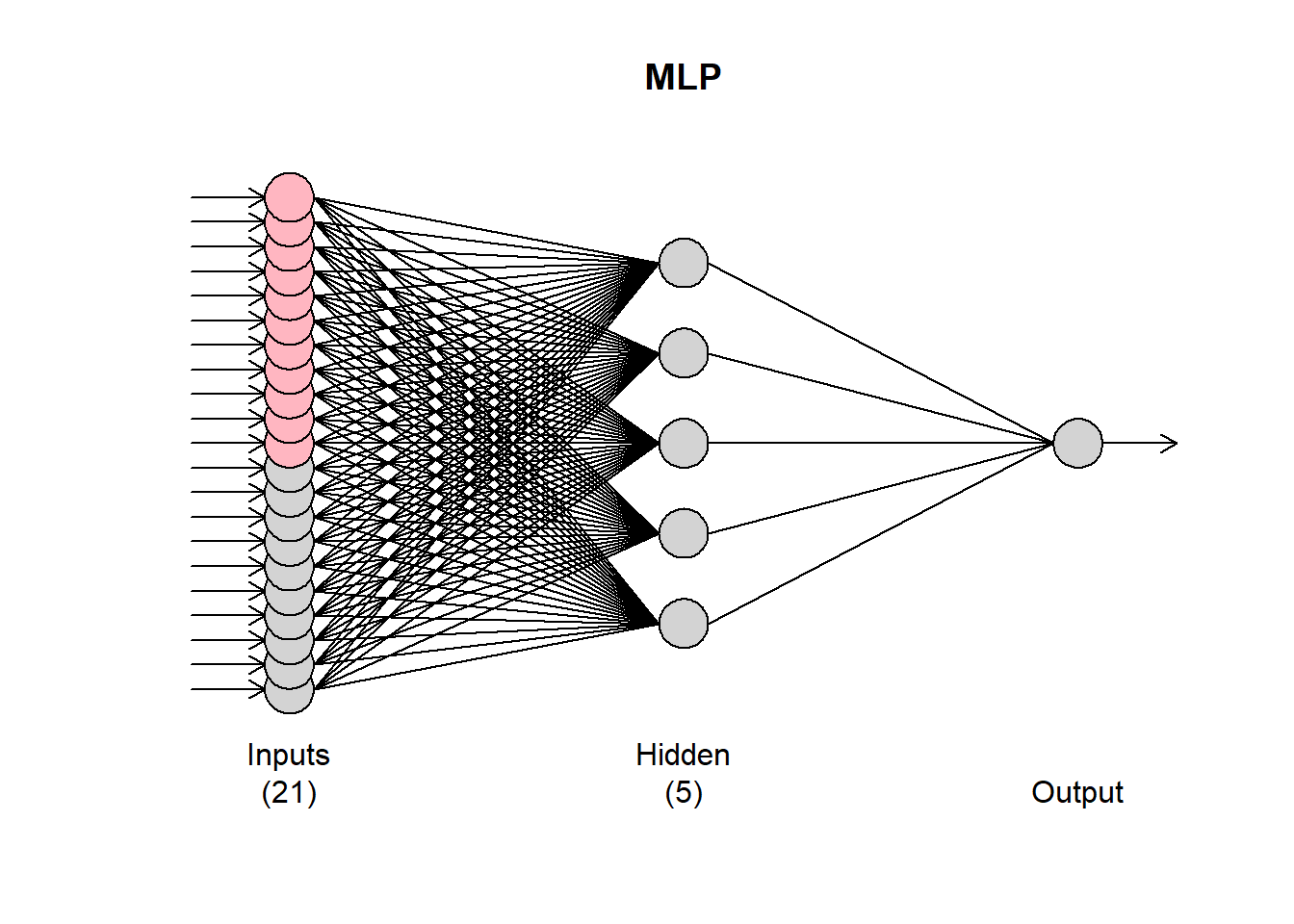
The grey input nodes are autoregressions, while the magenta ones are deterministic inputs (seasonality in this case). If any other regressors were included, they would be shown in light blue.

The mlp() function accepts several arguments to fine-tune the resulting network. The hd argument defines a fixed number of hidden nodes. If it is a single number, then the neurons are arranged in a single hidden node. If it is a vector, then these are arranged in multiple layers.

fit2 <- mlp(AirPassengers, hd = c(10,5))
plot(fit2)
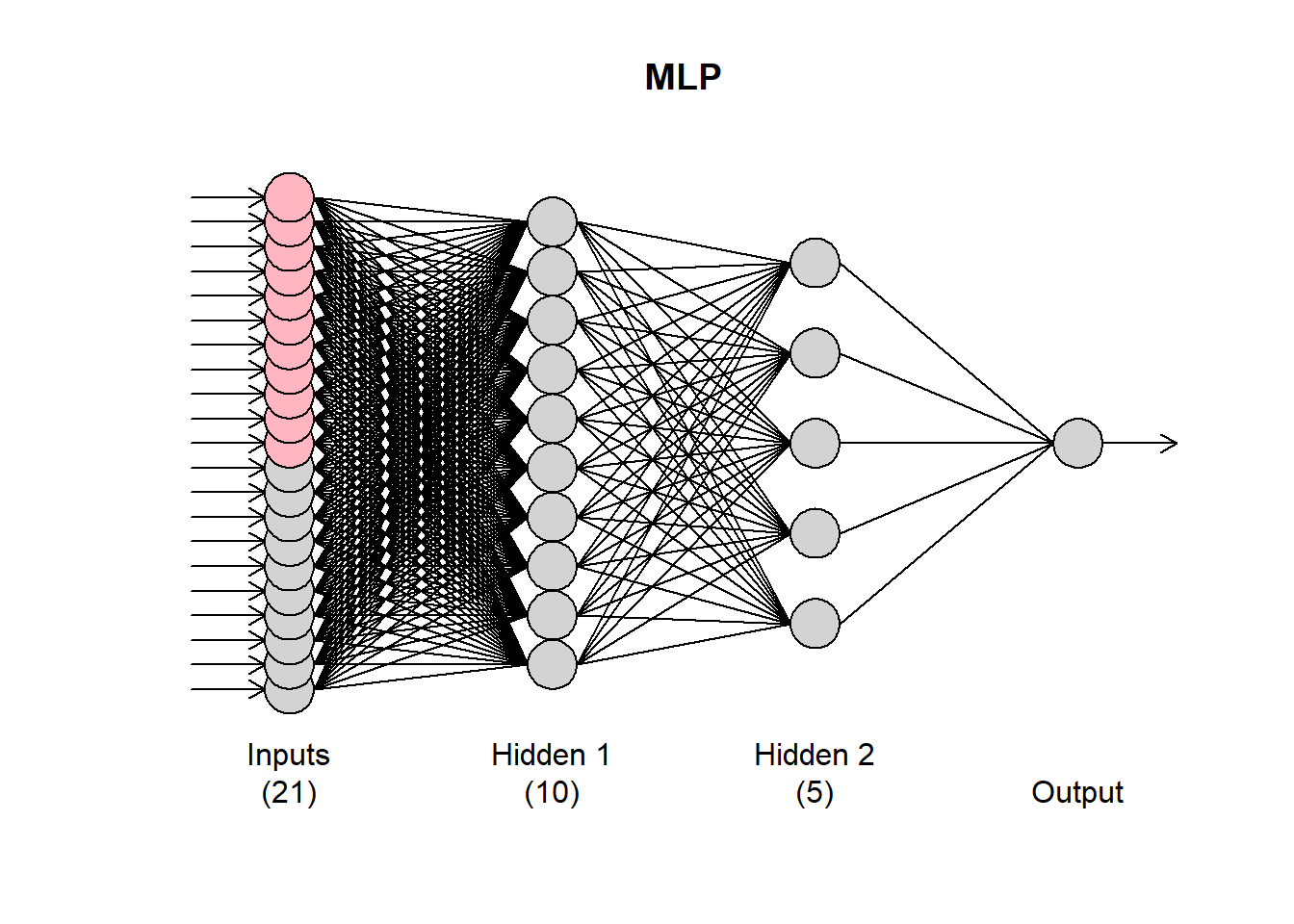
We will see later on how to automatically select the number of nodes. In my experience (and evidence from the literature), conventional neural networks, forecasting single time series, do not benefit from multiple hidden layers. The forecasting problem is typically just not that complex!

The argument reps defines how many training repetitions are used. If you want to train a single network you can use reps=1, although there is overwhelming evidence that there is no benefit in doing so. The default reps=20 is a compromise between training speed and performance, but the more repetitions you can afford the better. They help not only in the performance of the model, but also in the stability of the results, when the network is retrained. How the different training repetitions are combined is controlled by the argument comb that accepts the options median, mean, and mode. The mean and median are apparent. The mode is calculated using the maximum of a kernel density estimate of the forecasts for each time period. This is detailed in the aforementioned paper and exemplified here.

The argument lags allows you to select the autoregressive lags considered by the network. If this is not provided then the network uses lag 1 to lag m, the seasonal period of the series. These are suggested lags and they may not stay in the final networks. You can force that using the argument keep, or turn off the automatic input selection altogether using the argument sel.lag=FALSE. Observe the differences in the following calls of mlp().

mlp(AirPassengers, lags=1:24)
## MLP fit with 5 hidden nodes and 20 repetitions.
## Series modelled in differences: D1.
## Univariate lags: (1,2,4,7,8,9,10,11,12,13,18,21,23,24)
## Deterministic seasonal dummies included.
## Forecast combined using the median operator.
## MSE: 5.6388.
mlp(AirPassengers, lags=1:24, keep=c(rep(TRUE,12), rep(FALSE,12)))
## MLP fit with 5 hidden nodes and 20 repetitions.
## Series modelled in differences: D1.
## Univariate lags: (1,2,3,4,5,6,7,8,9,10,11,12,13,18,21,23,24)
## Deterministic seasonal dummies included.
## Forecast combined using the median operator.
## MSE: 3.6993.
mlp(AirPassengers, lags=1:24, sel.lag=FALSE)
## MLP fit with 5 hidden nodes and 20 repetitions.
## Series modelled in differences: D1.
## Univariate lags: (1,2,3,4,5,6,7,8,9,10,11,12,13,14,15,16,17,18,19,20,21,22,23,24)
## Deterministic seasonal dummies included.
## Forecast combined using the median operator.
## MSE: 1.7347.

In the first case lags (1,2,4,7,8,9,10,11,12,13,18,21,23,24) are retained. In the second case all 1-12 are kept and the rest 13-24 are tested for inclusion. Note that the argument keep must be a logical with equal length to the input used in lags. In the last case, all lags are retained. The selection of the lags heavily relies on this and this papers, with evidence of its performance on high-frequency time series outlined here. An overview is provided in: Ord K., Fildes R., Kourentzes N. (2017) Principles of Business Forecasting 2e. Wessex Press Publishing Co., Chapter 10.

Note that if the selection algorithm decides that nothing should stay in the network, it will include lag 1 always and you will get a warning message: No inputs left in the network after pre-selection, forcing AR(1).

Neural networks are not great in modelling trends. You can find the arguments for this here. Therefore it is useful to remove the trend from a time series prior to modelling it. This is handled by the argument difforder. If difforder=0 no differencing is performed. For diff=1, level differences are performed. Similarly, if difforder=12 then 12th order differences are performed. If the time series is seasonal with seasonal period 12, this would then be seasonal differences. You can do both with difforder=c(1,12) or any other set of difference orders. If difforder=NULL then the code decides automatically. If there is a trend, first differences are used. The series is also tested for seasonality. If there is, then the Canova-Hansen test is used to identify whether this is deterministic or stochastic. If it is the latter, then seasonal differences are added as well.

Deterministic seasonality is better modelled using seasonal dummy variables. by default the inclusion of dummies is tested. This can be controlled by using the logical argument allow.det.season. The deterministic seasonality can be either a set of binary dummies, or a pair of sine-cosine (argument det.type), as outlined here. If the seasonal period is more than 12, then the trigonometric representation is recommended for parsimony.

The logical argument outplot provides a plot of the fit of network.

The number of hidden nodes can be either preset, using the argument hd or automatically specified, as defined with the argument hd.auto.type. By default this is hd.auto.type="set" and uses the input provided in hd (default is 5). You can set this to hd.auto.type="valid" to test using a validation sample (20% of the time series), or hd.auto.type="cv" to use 5-fold cross-validation. The number of hidden nodes to evaluate is set by the argument hd.max.

fit3 <- mlp(AirPassengers, hd.auto.type="valid",hd.max=8)
print(fit3)
## MLP fit with 4 hidden nodes and 20 repetitions.
## Series modelled in differences: D1.
## Univariate lags: (1,2,3,4,5,6,7,8,10,12)
## Deterministic seasonal dummies included.
## Forecast combined using the median operator.
## MSE: 14.2508.

Given that training networks can be a time consuming business, you can reuse an already specified/trained network. In the following example, we reuse fit1 to a new time series.

x <- ts(sin(1:120*2*pi/12),frequency=12)
mlp(x, model=fit1)
## MLP fit with 5 hidden nodes and 20 repetitions.
## Series modelled in differences: D1.
## Univariate lags: (1,2,3,4,5,6,7,8,10,12)
## Deterministic seasonal dummies included.
## Forecast combined using the median operator.
## MSE: 0.0688.

This retains both the specification and the training from fit1. If you want to use only the specification, but retrain the network, then use the argument retrain=TRUE.

mlp(x, model=fit1, retrain=TRUE)
## MLP fit with 5 hidden nodes and 20 repetitions.
## Series modelled in differences: D1.
## Univariate lags: (1,2,3,4,5,6,7,8,10,12)
## Deterministic seasonal dummies included.
## Forecast combined using the median operator.
## MSE: 0.

Observe the difference in the in-sample MSE between the two settings.

Finally, you can pass arguments directly to the neuralnet() function that is used to train the networks by using the ellipsis ....

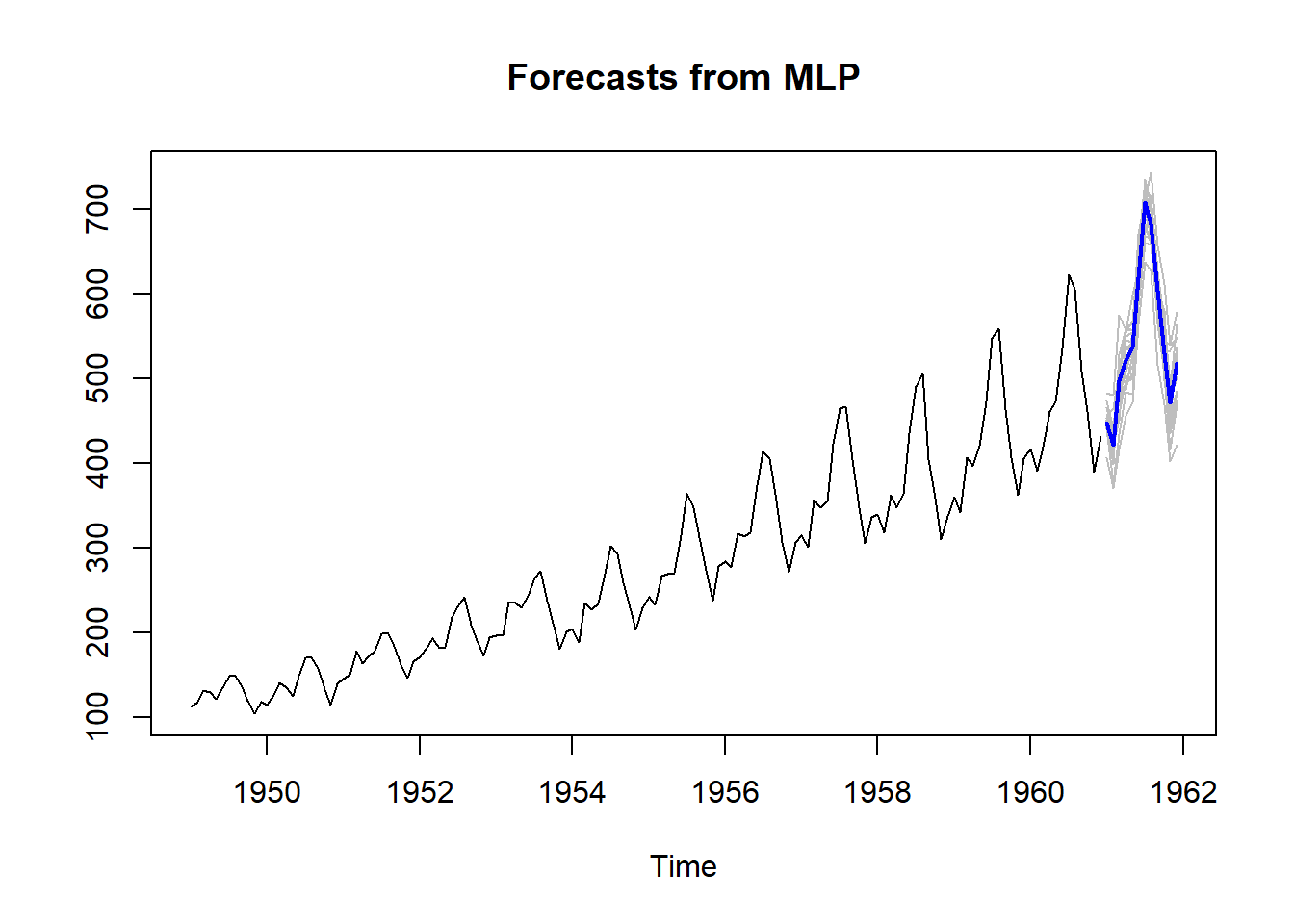
To produce forecasts, we use the function forecast(), which requires a trained network object and the forecast horizon h.

frc <- forecast(fit1,h=12)
print(frc)
##              Jan         Feb         Mar         Apr         May
## 1961 447.3392668 421.2532515 497.5052166 521.1640683 537.4031708
##              Jun         Jul         Aug         Sep         Oct
## 1961 619.5015908 707.8790407 681.0523280 602.8467629 529.0477736
##              Nov         Dec
## 1961 470.8292734 517.6762262
plot(frc)

The plot of the forecasts provides in grey the forecasts of all the ensemble members. The output of forecast() is of class forecast and those familiar with the forecast package will find familiar elements there. To access the point forecasts use frc$mean. The frc$all.mean contains the forecasts of the individual ensemble members.

Using regressors

There are three arguments in the mlp() function that enable to use explanatory variables: xreg, xreg.lags and xreg.keep. The first is used to input additional regressors. These must be organised as an array and be at least as long as the in-sample time series, although it can be longer. I find it helpful to always provide length(y)+h. Let us suppose that we want to use a deterministic trend to forecast the time series. First, we construct the input and then model the series.

z <- 1:(length(AirPassengers)+24) # I add 24 extra observations for the forecasts
z <- cbind(z) # Convert it into a column-array
fit4 <- mlp(AirPassengers,xreg=z,xreg.lags=list(0),xreg.keep=list(TRUE),
            # Add a lag0 regressor and force it to stay in the model
            difforder=0) # Do not let mlp() to remove the stochastic trend
print(fit4)
## MLP fit with 5 hidden nodes and 20 repetitions.
## Univariate lags: (1,4,5,8,9,10,11,12)
## 1 regressor included.
## - Regressor 1 lags: (0)
## Deterministic seasonal dummies included.
## Forecast combined using the median operator.
## MSE: 32.4993.

The output reflects the inclusion of the regressor. This is reflected in the plot of the network with a light blue input.

plot(fit4)

Observe that z is organised as an array. If this is a vector you will get an error. To include more lags, we expand the xreg.lags:

mlp(AirPassengers,difforder=0,xreg=z,xreg.lags=list(1:12))
## MLP fit with 5 hidden nodes and 20 repetitions.
## Univariate lags: (1,4,5,8,9,10,11,12)
## Deterministic seasonal dummies included.
## Forecast combined using the median operator.
## MSE: 48.8853.

Observe that nothing was included in the network. We use the xreg.keep to force these in.

mlp(AirPassengers,difforder=0,xreg=z,xreg.lags=list(1:12),xreg.keep=list(c(rep(TRUE,3),rep(FALSE,9))))
## MLP fit with 5 hidden nodes and 20 repetitions.
## Univariate lags: (1,4,5,8,9,10,11,12)
## 1 regressor included.
## - Regressor 1 lags: (1,2,3)
## Deterministic seasonal dummies included.
## Forecast combined using the median operator.
## MSE: 32.8439.

Clearly, the network does not like the deterministic trend! It only retains it, if we force it. Observe that both xreg.lags and xreg.keep are lists. Where each list element corresponds to a column in xreg. As an example, we will encode extreme residuals of fit1 as a single input (see this paper for a discussion on how networks can code multiple binary dummies in a single one). For this I will use the function residout() from the tsutils package.

if (!require("tsutils")){install.packages("tsutils")}
library(tsutils)
loc <- residout(AirPassengers - fit1$fitted, outplot=FALSE)$location
zz <- cbind(z, 0)
zz[loc,2] <- 1
fit5 <- mlp(AirPassengers,xreg=zz, xreg.lags=list(c(0:6),0),xreg.keep=list(rep(FALSE,7),TRUE))
print(fit5)
## MLP fit with 5 hidden nodes and 20 repetitions.
## Series modelled in differences: D1.
## Univariate lags: (1,2,3,4,5,6,7,8,10,12)
## 1 regressor included.
## - Regressor 1 lags: (0)
## Deterministic seasonal dummies included.
## Forecast combined using the median operator.
## MSE: 7.2178.

Obviously, you can include as many regressors as you want.

To produce forecasts, we use the forecast() function, but now use the xreg input. The way to make this work is to input the regressors starting from the same observation that was used during the training of the network, expanded as need to cover the forecast horizon. You do not need to eliminate unused regressors. The network will take care of this.

frc.reg <- forecast(fit5,xreg=zz)

Forecasting with ELMs

To use Extreme Learning Machines (EMLs) you can use the function elm(). Many of the inputs are identical to mlp(). By default ELMs start with a very large hidden layer (100 nodes) that is pruned as needed.

fit6 <- elm(AirPassengers)
print(fit6)
## ELM fit with 100 hidden nodes and 20 repetitions.
## Series modelled in differences: D1.
## Univariate lags: (1,2,3,4,5,6,7,8,10,12)
## Deterministic seasonal dummies included.
## Forecast combined using the median operator.
## Output weight estimation using: lasso.
## MSE: 91.288.
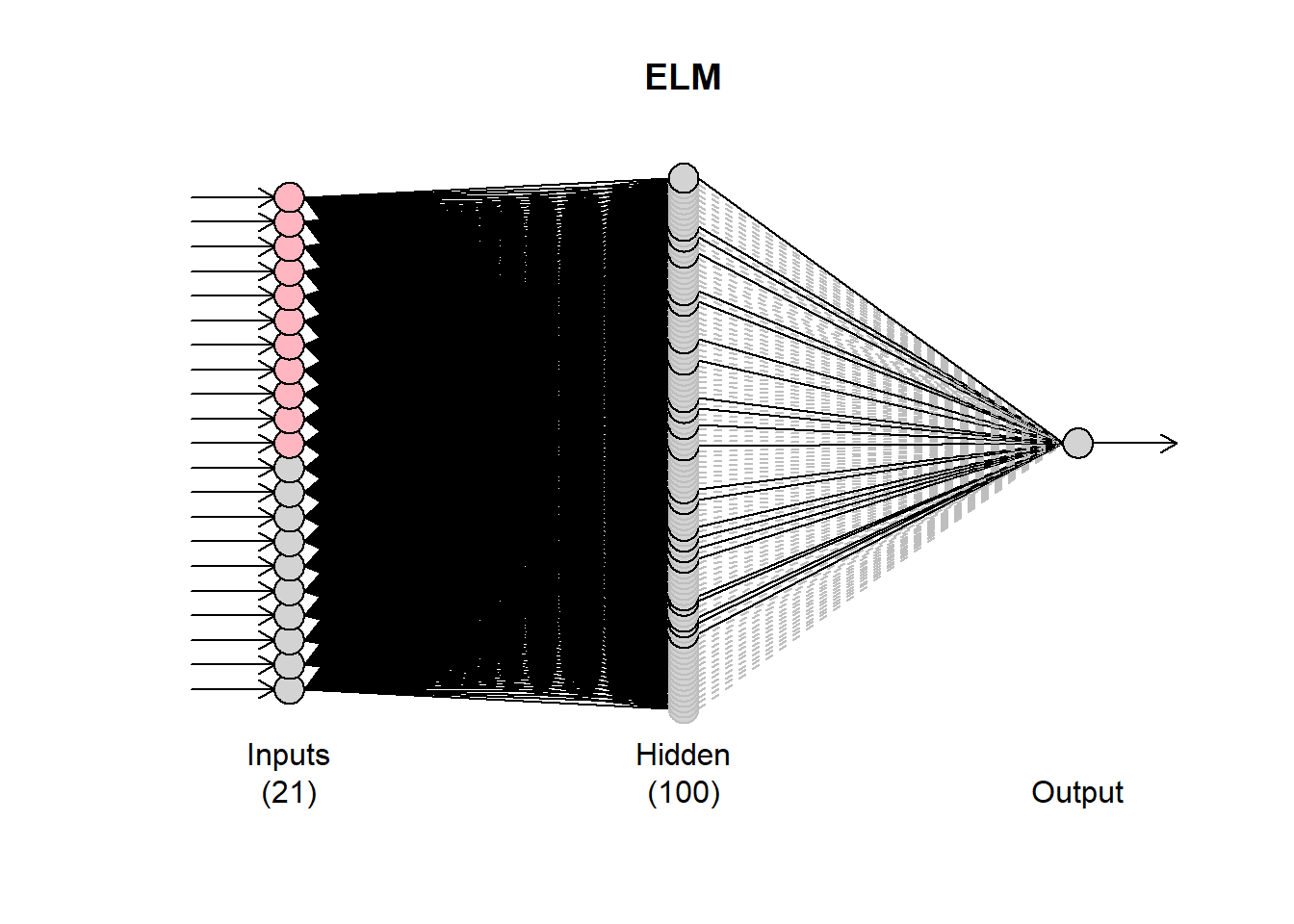
plot(fit6)

Observe that the plot of the network has some black and some grey lines. The latter are pruned. There are 20 networks fitted (controlled by the argument reps). Each network may have different final connections. You can inspect these by using plot(fit6,1), where the second argument defines which network to plot.

par(mfrow=c(2,2))
for (i in 1:4){plot(fit6,i)}
par(mfrow=c(1,1))
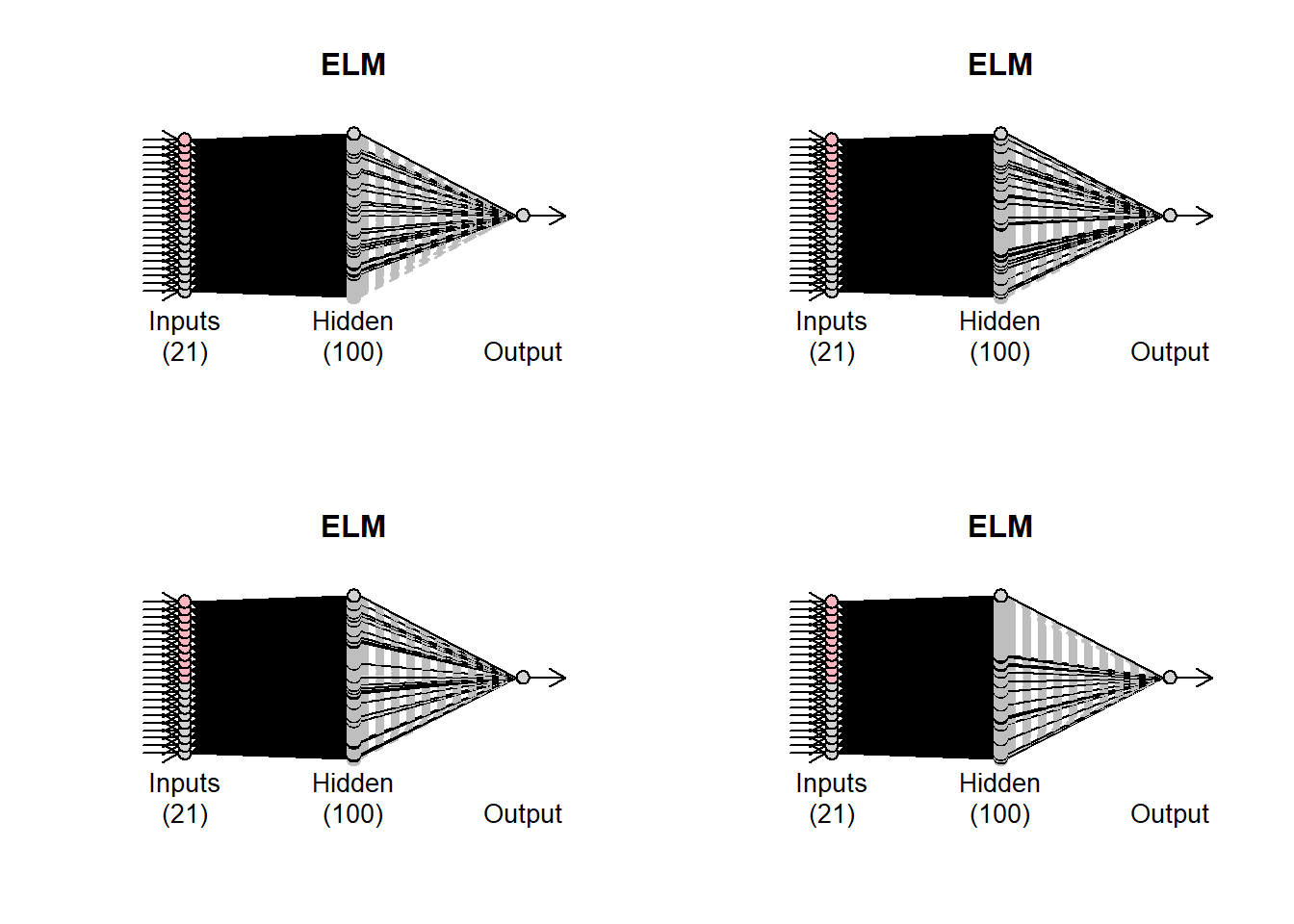
How the pruning is done is controlled by the argument.type The default option is to use LASSO regression (type=“lasso”). Alternatively, use can use “ridge” for ridge regression, “step” for stepwise OLS and “lm” to get the OLS solution with no pruning.

The other difference from the mlp() function is the barebone argument. When this is FALSE, then the ELMs are built based on the neuralnet package. If this is set to TRUE then a different internal implementation is used, which is helpful to speed up calculations when the number of inputs is substantial.

To forecast, use the forecast() function in the same way as before.

forecast(fit6,h=12)
##              Jan         Feb         Mar         Apr         May
## 1961 449.0982276 423.0329121 455.7643540 488.5096713 499.3616506
##              Jun         Jul         Aug         Sep         Oct
## 1961 567.7486203 645.6309202 622.8311280 543.9549163 495.8305278
##              Nov         Dec
## 1961 429.9258197 468.7921570

Temporal hierarchies and nnfor

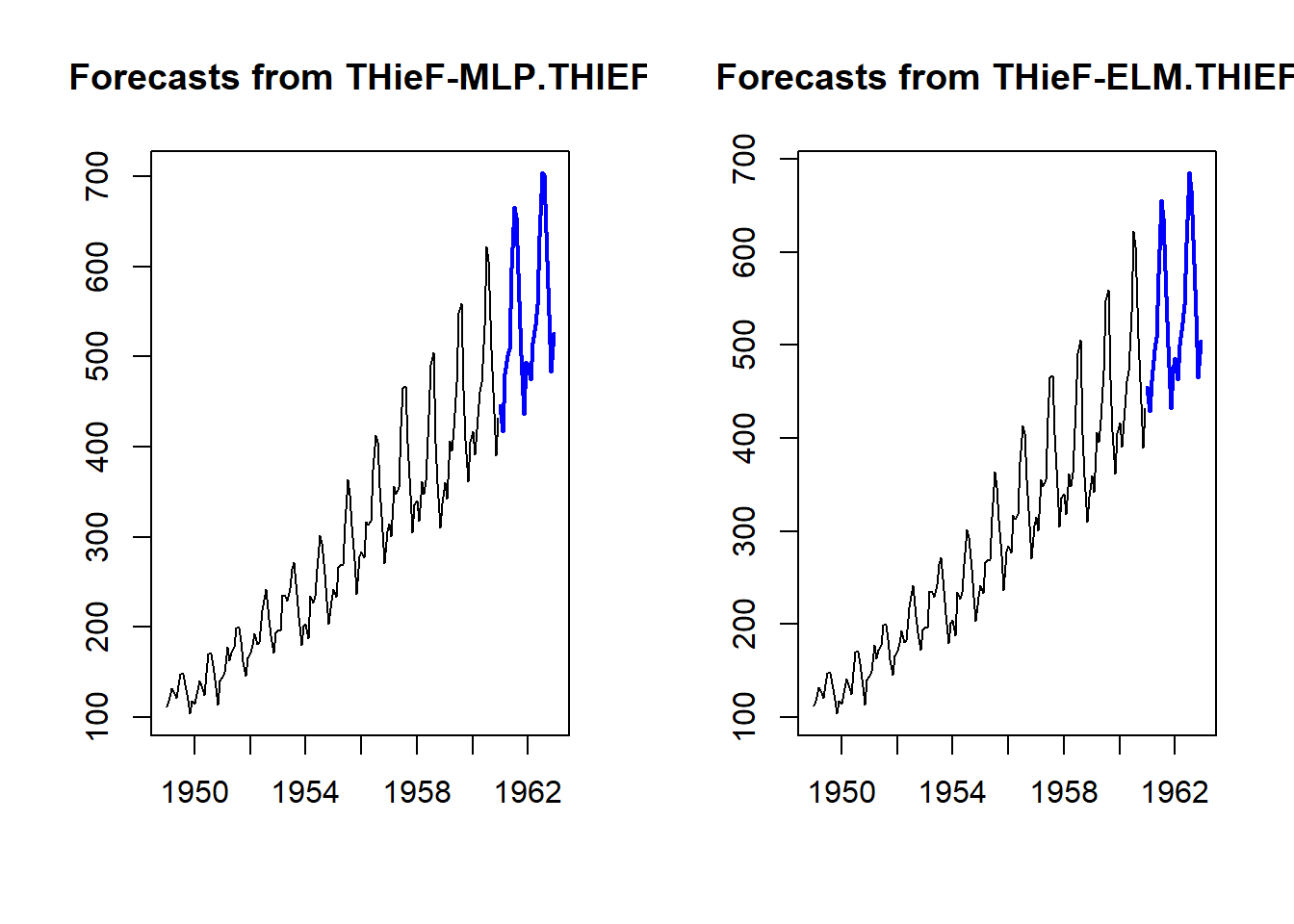
People who have followed my research will be familiar with Temporal Hierarchies that are implemented in the package thief. You can use both mlp() and elm() with thief() by using the functions mlp.thief() and elm.thief().

if (!require("thief")){install.packages("thief")}
library(thief)
thiefMLP <- thief(AirPassengers,forecastfunction=mlp.thief)
# Similarly elm.thief:
thiefELM <- thief(AirPassengers,forecastfunction=elm.thief)
par(mfrow=c(1,2))
plot(thiefMLP)
plot(thiefELM)
par(mfrow=c(1,1))
This should get you going with time series forecasting with neural networks.

Happy forecasting!

R package: tsutils

The tsutils package for R includes functions that help with time series exploration and forecasting, that were previously included in the TStools package that is only available on github. The name change was necessary as there is another package on CRAN with the same name. The objective of TStools is to provide a development and testing ground for various functions developed by my group that has led to the creation of various packages over time, such as smooth, nnfor and now tsutils.

The package provides functions to support the following tasks:

  1. tests and visualisations that can help the modeller explore time series components and perform decomposition;
  2. modelling shortcuts, such as functions to construct lagmatrices and seasonal dummy variables of various forms;
  3. an implementation of the Theta method;
  4. tools to facilitate the design of the forecasting process, such as ABC-XYZ analyses;
  5. “quality of life” tools, such as treating time series for trailing and leading values.

We will look at some of these functions here, to show you how tsutils can be helpful in your forecasting projects.

Time series exploration

Exploring your time series is an important step in modelling them. Some standard questions that one has to consider is whether a time series exhibits trend and/or seasonality. First, we deal with the existence of trend. To look into this, it is useful to extranct the Centred Moving Average, and to do this you can use the functon cmav().

library(tsutils)
cma <- cmav(referrals) # referrals in a series included in the tsutils package.

The cmav() function offers a few useful arguments. By default it takes the length of the moving average from the time series information and sets it equal to its frequency. The user can override this by setting the argument ma. Another useful argument is fill=c(TRUE,FALSE) that instructs the function to fill the first and last observations of the centred moving average that are ommited in the calculation, due to the “centering”. This is done using exponential smoothing (ets() from the forecast package). This is done by default. The argument fast restricts the number of exponential smoothing models considered to speed up the calculation. Finallly the argument outplot=c(FALSE,TRUE) provides a plot of the time sereis and the calculated centred moving average.The CMA can help us identify whether there is a trend visually (see this paper for a discussion), but also to help us with statistical testing.

The function trendtest() provides a logical (TRUE/FALSE) answer for the presence of trend in a time series. It offers two alternatives, controlled by the argument type, which can take the values "aicc" or "cs" that tests by either fitting alternative exponential smoothing models and comparing their AICc or by using the Cox-Stuart test at 5% significance (you can run the test on its own using the function coxstuart()). The test can be conducted on the raw time series, or its CMA, the latter providing a cleaner signal of the low frequency components of the series, a major component of which is the trend. This is controlled by the argument extract. When this is TRUE the test is conducted on the CMA.

# Test on the CMA
trendtest(referrals, extract=TRUE)
## [1] TRUE
# Test on the raw time series
trendtest(referrals, extract=FALSE)
## [1] FALSE

We can see that testing on the unfiltered data provides a different response. A further (experimental) argument is mta that instructs the function to use Multiple Temporal Aggregation, as proposed in the paper that introduces MAPA. Some evidence of the effect of this is provided here, where it increases the accuracy of both approaches, AICc or Cox-Stuart testing.

The function seasplot() is handy for exploring the seasonality of the time series. This provides various arguments for controlling the result. You can manually set the seasonal length (ma – otherwise it uses frequency(y)), the starting period of the seasonal cycle (s – also picked up from the time series object, if available), assume trend being present, absent or test (trend), type of decomposition when trend is present (decomposition) and using precaclculated CMA for the decomposition (cma – use NULL for calculating internally). If there is trend in the time series (as set by the user, or tested) then the time series is first de-trended according to the decomposition setting and then the seasonal plot is produced.

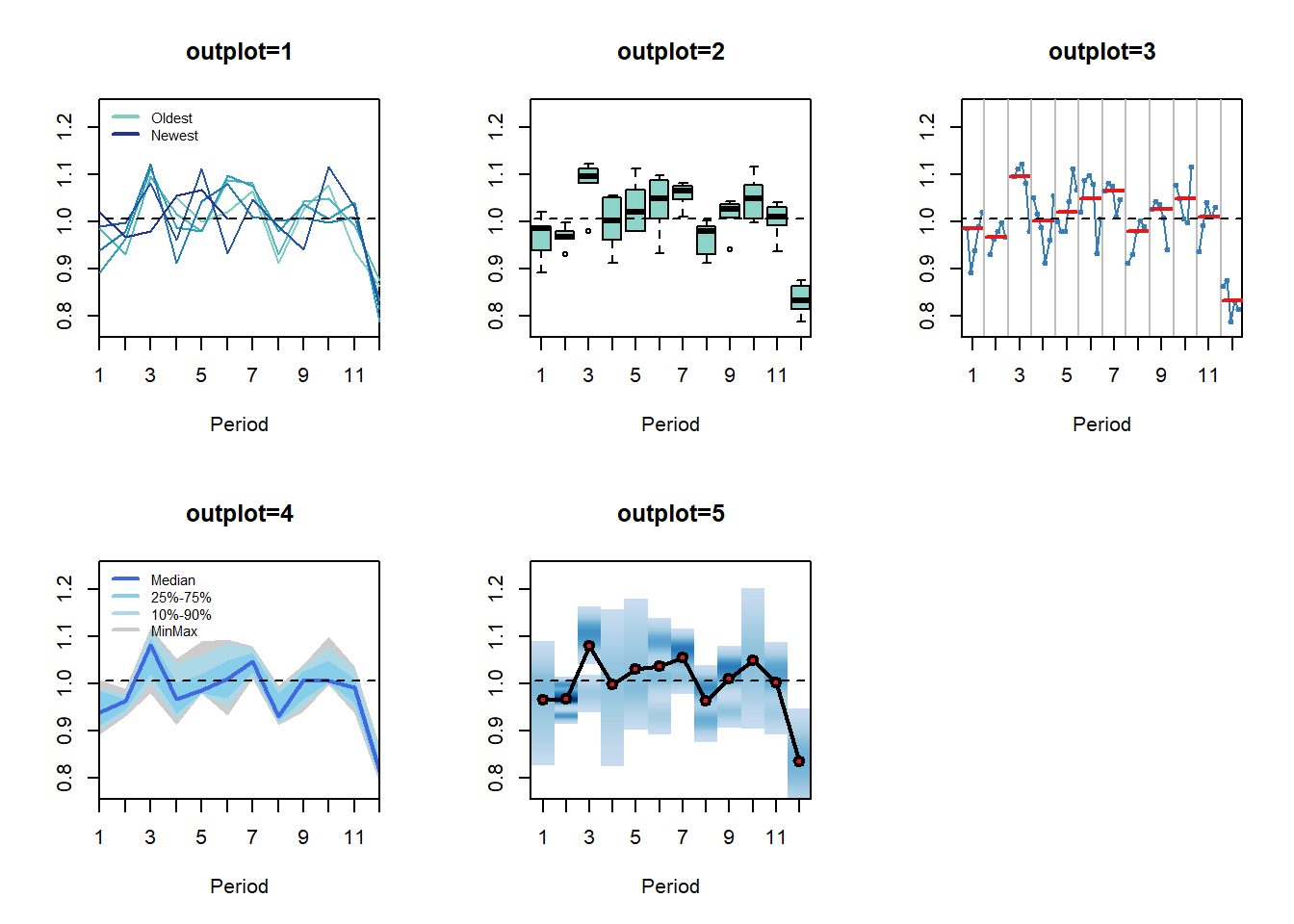
There are a number of arguments to control the visualisation of seasonality. The argument outplot takes the following options:

  • 0, no plot;
  • 1, seasonal diagram;
  • 2, seasonal boxplots;
  • 3, seasonal subseries;
  • 4, seasonal distribution;
  • 5, seasonal density.

In addition, one can provide various arguments to the plot function (consider in the ... input), override the colouring (colour) and the labels (labels).

seasplot(referrals)## Results of statistical testing
## Evidence of trend: TRUE  (pval: 0)
## Evidence of seasonality: TRUE  (pval: 0.002)

The figure below exemplifies the available ploting alternatives.The function provides some useful results, organised in a list: the trend and seasonal compoonents, the logical result of testing for their presence and the p-value of the tests. The trend is tested using the coxstuart() function, while the seasonality is tested by applying the Friedman test on the data as organised for `outplot=2’, i.e. is there evidence that at least one of the ranks of the distributions of the seasonal indices is significantly different from the rest?

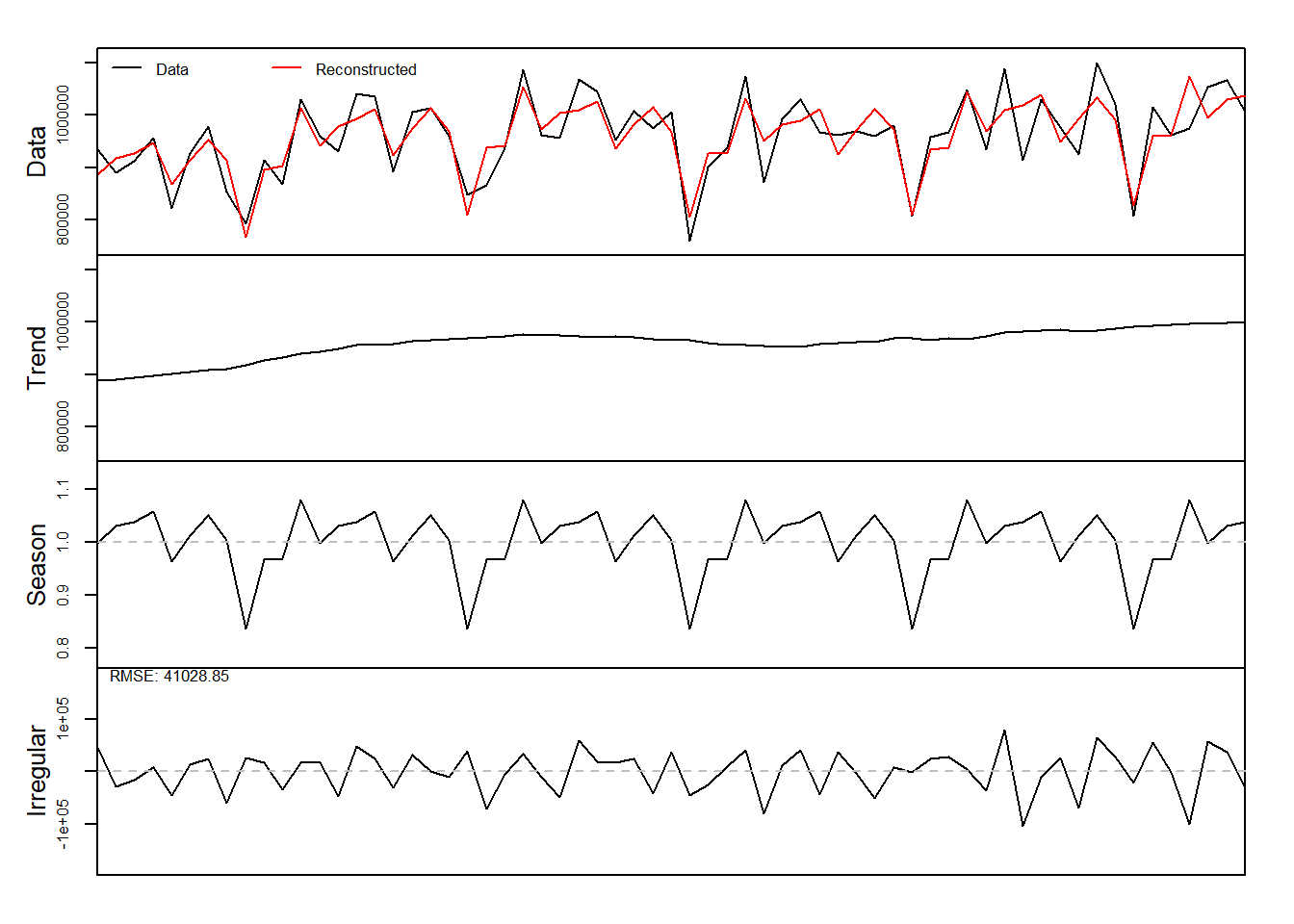
Finally, the function decomp() provides classical time series decomposition. Many of the arguments are similar to the seasplot function. Note that type now defines the method that is used to calculate the seasonal indices, which can be the arithmetic mean, median or a “pure seasonal” exponential smoothing model. That is, simply applying an exponential smoothing on the seasonal indices to smooth any randomness. As the later makes it complicated to extrapolate the seasonal component, the function accepts the argument h to provide predicted seasonal indices for h-steps ahead. Additionally for the calculation of the arithmetic mean one can winsorise extremes using the argument w.

dc <- decomp(referrals,outplot=TRUE)

names(dc)
## [1] "trend"     "season"    "irregular" "f.season"  "g"

You can see that the output of the function is a list containing the various time series components. Note that decomp() does not test for the presence of seasonality will always extract a seasonal component.

Time series modelling

There are a few fuctions that are designed with regression modelling in mind. The function lagmatrix() takes an input variable and constructs leads and lags as required.

lags <- lagmatrix(referrals, c(0,1,3:5))
head(lags,10)
##         [,1]   [,2]   [,3]   [,4]   [,5]
##  [1,] 933976     NA     NA     NA     NA
##  [2,] 890852 933976     NA     NA     NA
##  [3,] 912027 890852     NA     NA     NA
##  [4,] 955852 912027 933976     NA     NA
##  [5,] 821916 955852 890852 933976     NA
##  [6,] 928176 821916 912027 890852 933976
##  [7,] 979219 928176 955852 912027 890852
##  [8,] 853812 979219 821916 955852 912027
##  [9,] 792731 853812 928176 821916 955852
## [10,] 913787 792731 979219 928176 821916

The first column is the original variable (lag 0), while the other columns are the requested lagged realisations. Leads are constructed by using negative numbers for the argument lag.

The function seasdummy() creates seasonal dummy variables that can be either binary or trigonometric, as defined by the argument type=c("bin","trg"). Other arguments are the number of observations to create (n), the seasonal periodicity (m), a time series (y) that is an optional argument and can be useful to get the seasonal periodicity and the starting period information. The latter is useful when the seasonality is trigonometric to get the phase of the sines and cosines correctly. Argument full retains or drops the m-th dummy variable. For linear models that would typically be set to full=FALSE. For nonlinear models this becomes a somewhat more interesting modelling question. Some evidence for neural networks is provided in this paper.

seasdummy(n=10,m=12)
##       [,1] [,2] [,3] [,4] [,5] [,6] [,7] [,8] [,9] [,10] [,11]
##  [1,]    1    0    0    0    0    0    0    0    0     0     0
##  [2,]    0    1    0    0    0    0    0    0    0     0     0
##  [3,]    0    0    1    0    0    0    0    0    0     0     0
##  [4,]    0    0    0    1    0    0    0    0    0     0     0
##  [5,]    0    0    0    0    1    0    0    0    0     0     0
##  [6,]    0    0    0    0    0    1    0    0    0     0     0
##  [7,]    0    0    0    0    0    0    1    0    0     0     0
##  [8,]    0    0    0    0    0    0    0    1    0     0     0
##  [9,]    0    0    0    0    0    0    0    0    1     0     0
## [10,]    0    0    0    0    0    0    0    0    0     1     0

For example, one can use these two functions to quick construct dynamic regression models.

Xl <- lagmatrix(referrals,c(0:2))
Xd <- seasdummy(n=length(referrals),y=referrals)
X <- as.data.frame(cbind(Xl,Xd))
colnames(X) <- c("y",paste0("lag",1:2),paste0("d",1:11))
fit <- lm(y~.,X)
summary(fit)
## 
## Call:
## lm(formula = y ~ ., data = X)
## 
## Residuals:
##    Min     1Q Median     3Q    Max 
## -99439 -43116   7114  38919  98649 
## 
## Coefficients:
##              Estimate Std. Error t value Pr(>|t|)    
## (Intercept) 4.808e+05  1.695e+05   2.836  0.00672 ** 
## lag1        1.469e-01  1.337e-01   1.098  0.27760    
## lag2        1.799e-01  1.397e-01   1.288  0.20394    
## d1          1.751e+05  3.820e+04   4.584 3.38e-05 ***
## d2          1.867e+05  4.161e+04   4.488 4.64e-05 ***
## d3          2.445e+05  3.485e+04   7.015 7.75e-09 ***
## d4          1.285e+05  4.204e+04   3.056  0.00369 ** 
## d5          1.840e+05  3.892e+04   4.727 2.10e-05 ***
## d6          2.020e+05  3.709e+04   5.447 1.83e-06 ***
## d7          2.054e+05  3.621e+04   5.673 8.39e-07 ***
## d8          1.139e+05  3.613e+04   3.152  0.00282 ** 
## d9          1.698e+05  3.604e+04   4.713 2.21e-05 ***
## d10         2.168e+05  3.749e+04   5.783 5.73e-07 ***
## d11         1.616e+05  3.658e+04   4.418 5.83e-05 ***
## ---
## Signif. codes:  0 '***' 0.001 '**' 0.01 '*' 0.05 '.' 0.1 ' ' 1
## 
## Residual standard error: 56250 on 47 degrees of freedom
##   (2 observations deleted due to missingness)
## Multiple R-squared:  0.5882, Adjusted R-squared:  0.4743 
## F-statistic: 5.165 on 13 and 47 DF,  p-value: 1.365e-05

Obviously, one might prefer to have the seasonal dummies as a factor variable, when these are to be coded as binary dummy variables. Users of the nnfor package may recognise these two functions. In the next release of that package, both functions will be moved to the tsutils (this is already done in the development version).

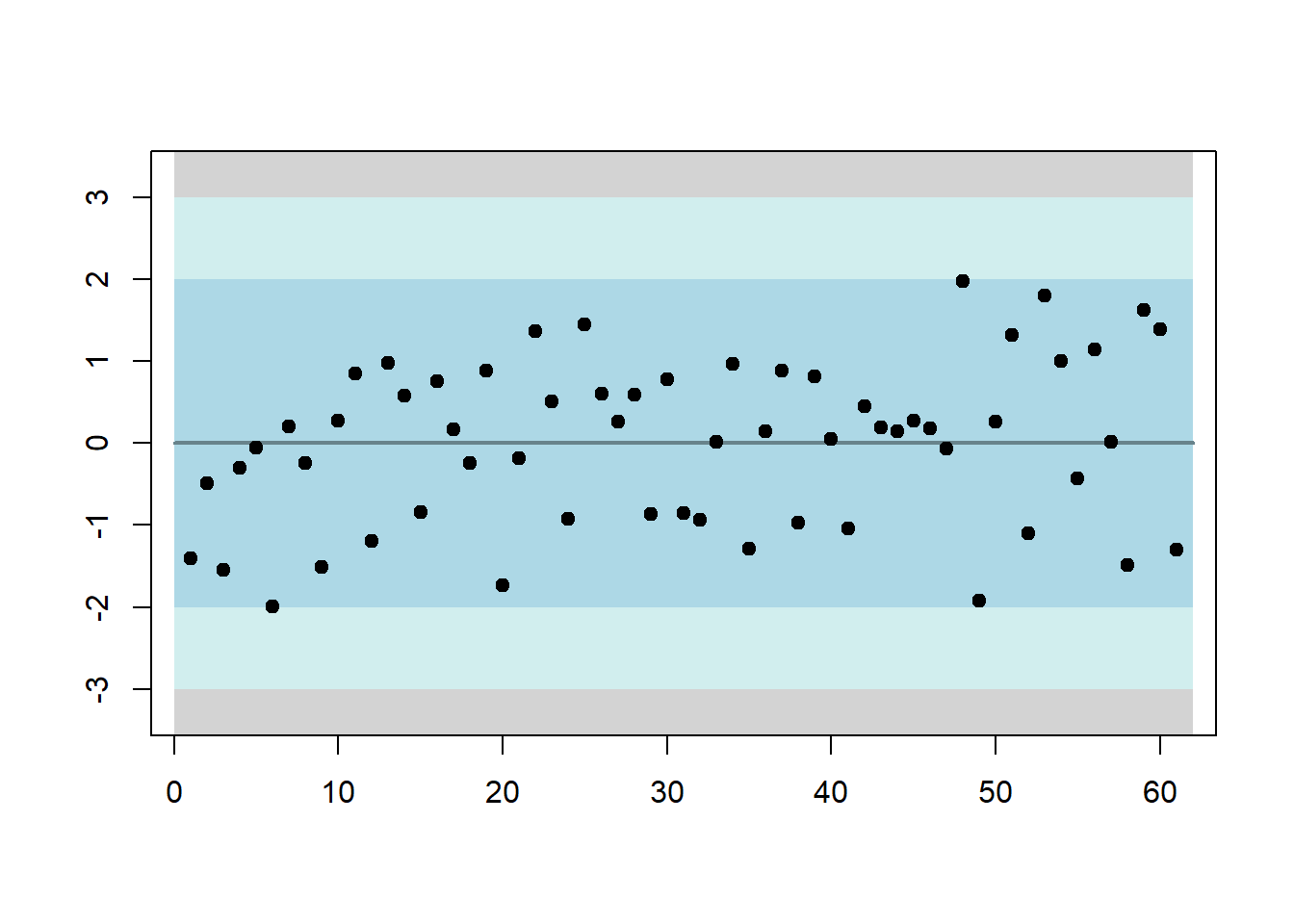
The function residout() looks at model residuals from a control chart point of view and identifies outlying ones. You can manually set the threshold over which the standardised residuals will be considered outlier (t) and whether to produce a plot (outplot).

rsd <- residout(residuals(fit))

If there are outliers, their location and values are provided in the outputted list.

err <- rnorm(20)
err[5] <- err[5]+5
residout(err,outplot=FALSE)$location
## [1] 5

The idea behind this function is to identify outliers so that the modeller can construct dummies to account for them or manipulate them otherwise.

A somewhat more exotic function is getOptK that provides the optimal temporal aggregation level for AR(1), MA(1) and ARMA(1,1) processes. The user defines the type of data generating process that we expect (type=c("ar","ma","arma")) and the maximum aggregation level (m). The output is the theoretically optimal aggregation level.

getOptK(referrals) # This time series is clearly not an AR(1)!
## [1] 9

For a discussion of the pros and cons of this theoretical calculation see this paper. My personal view is that Multiple Temporal Aggregation as implemented in MAPA or Temporal Hierarchies (thief) is a less risky modelling approach and therefore more desirable for practice.

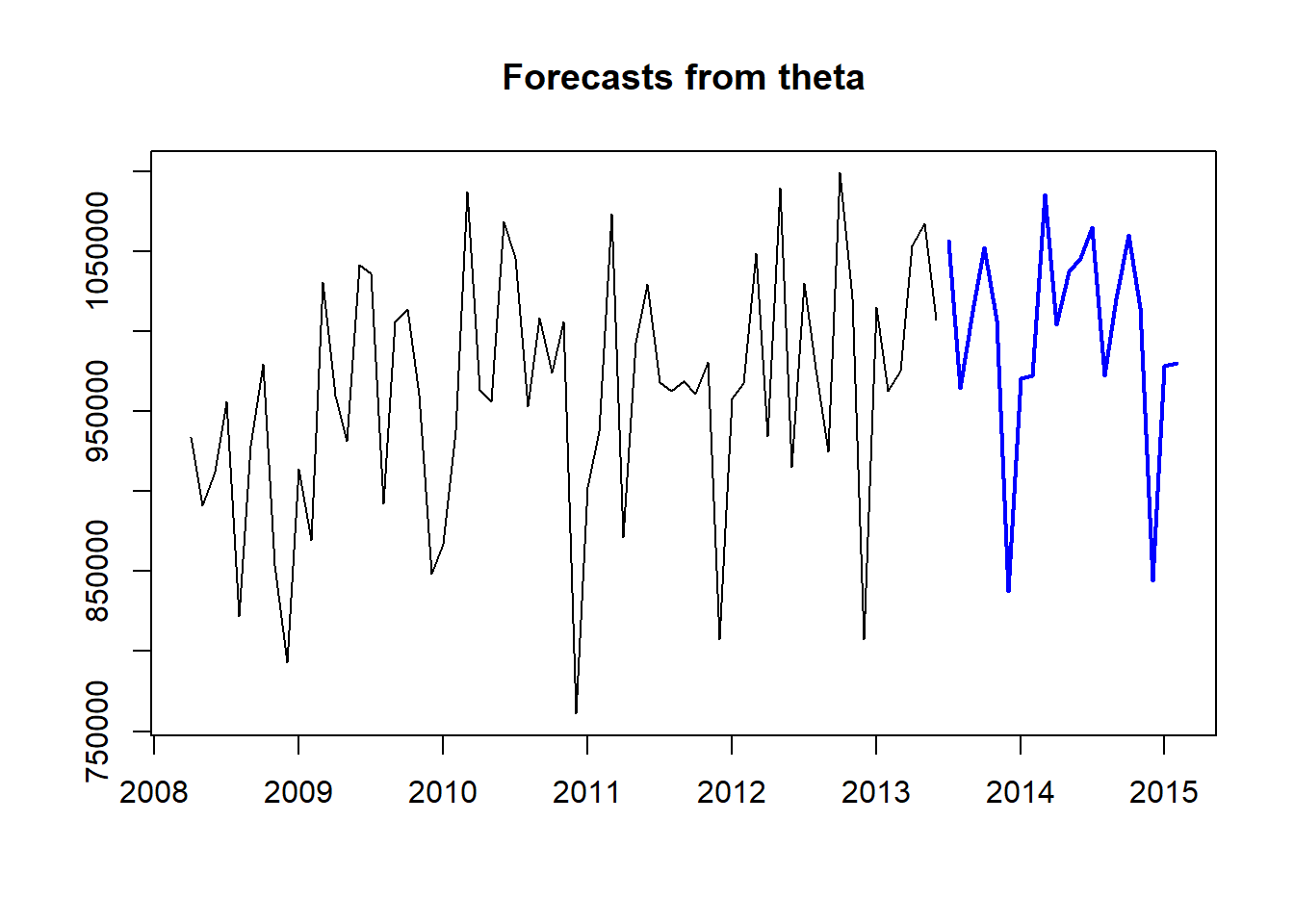
The function theta() provides an implementation of the classical Theta method, with a few modifications. The workflow matches the one in the forecast package:

fit <- theta(referrals)
frc <- forecast.theta(fit,h=20)
plot(frc)

This implementation of the Theta method tests for seasonality and trend. Seasonal decomposition can be done either additively or multiplicatively and the seasonality is treated as a pure seasonal model. The various Theta components can be optimised using different cost functions. The originally proposed Theta method always assumed multiplicative seasonality and presence of trend, while all theta lines were optimised using MSE and seasonality was estimated using classical decomposition and arithmetic mean. The various arguments of the function can control how theta() operates: m can be used to manually set the seasonal length, sign.level the significance level for the statistical tests, cost0 to cost2 the cost function for the various components of the model, multiplicative the type of decomposition used and cma an optional pre-calculated Centred Moving Average used for decomposition and testing. Also note that since impolementation is not based on a model, it does not provide prediction intervals or information criteria.

If you are a user of thief (if not give it a try!) the function theta.thief() integrates both packages:

library(thief)
thief(referrals,forecastfunction=theta.thief)
##            Jan       Feb       Mar       Apr       May       Jun       Jul
## 2013                                                             1035418.8
## 2014  955320.7  957015.3 1067922.5  984519.0 1019637.9 1027866.9 1040235.2
## 2015  959464.4  961167.2 1072865.8  988823.4 1024207.9 1032495.2          
##            Aug       Sep       Oct       Nov       Dec
## 2013  943204.9  991756.3 1031436.6  987854.5  819194.1
## 2014  947299.6  996207.8 1036200.5  992380.8  822408.6
## 2015

In this case temporal hierarchy forecasts are constructed using the Theta method, as implmemented in tsutils, at all temporal aggregation levels.

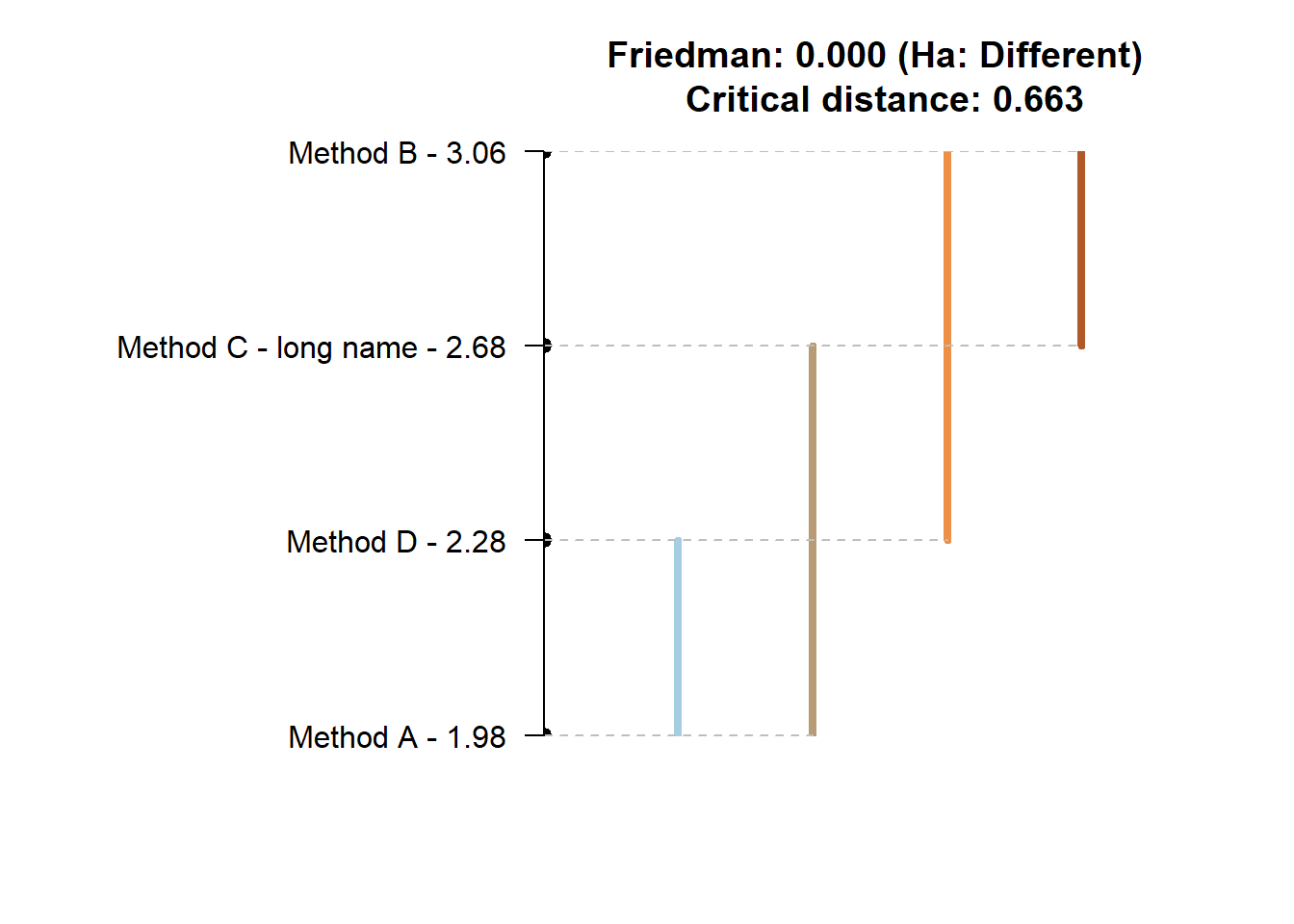
One of the major tasks in producing the appropriate forecasts for a time series is evaluating the performance of different models/methods. The nemenyi() function is helpful to perform nonparametric multiple comparisons testing. There are two considerations. First, some difference in summary performance statistics does not always mean that one forecast is indeed preferable, as differences may still be due to randomeness, and more evidence is necessary. Second, doing repeated pairwise testing between methods does not result in the desired significance in the results, as by doing this repetition is distorting your testing probabilities. The nemenyi() function first performs a Friedman test to establish that at least one method performs significantly different and then uses the post-hoc Nemenyi test to group methods by similar performance. Both tests are nonparametric, and therefore the distribution of the performance metric is not an issue.

x <- matrix( rnorm(50*4,mean=0,sd=1), 50, 4) # Generate some performance statistics
x[,2] <- x[,2]+1 
x[,3] <- x[,3]+0.7
x[,4] <- x[,4]+0.5
colnames(x) <- c("Method A","Method B","Method C - long name","Method D")
nemenyi(x)
## Friedman and Nemenyi Tests
## The confidence level is 5%
## Number of observations is 50 and number of methods is 4
## Friedman test p-value: 2e-04 - Ha: Different
## Critical distance: 0.6633

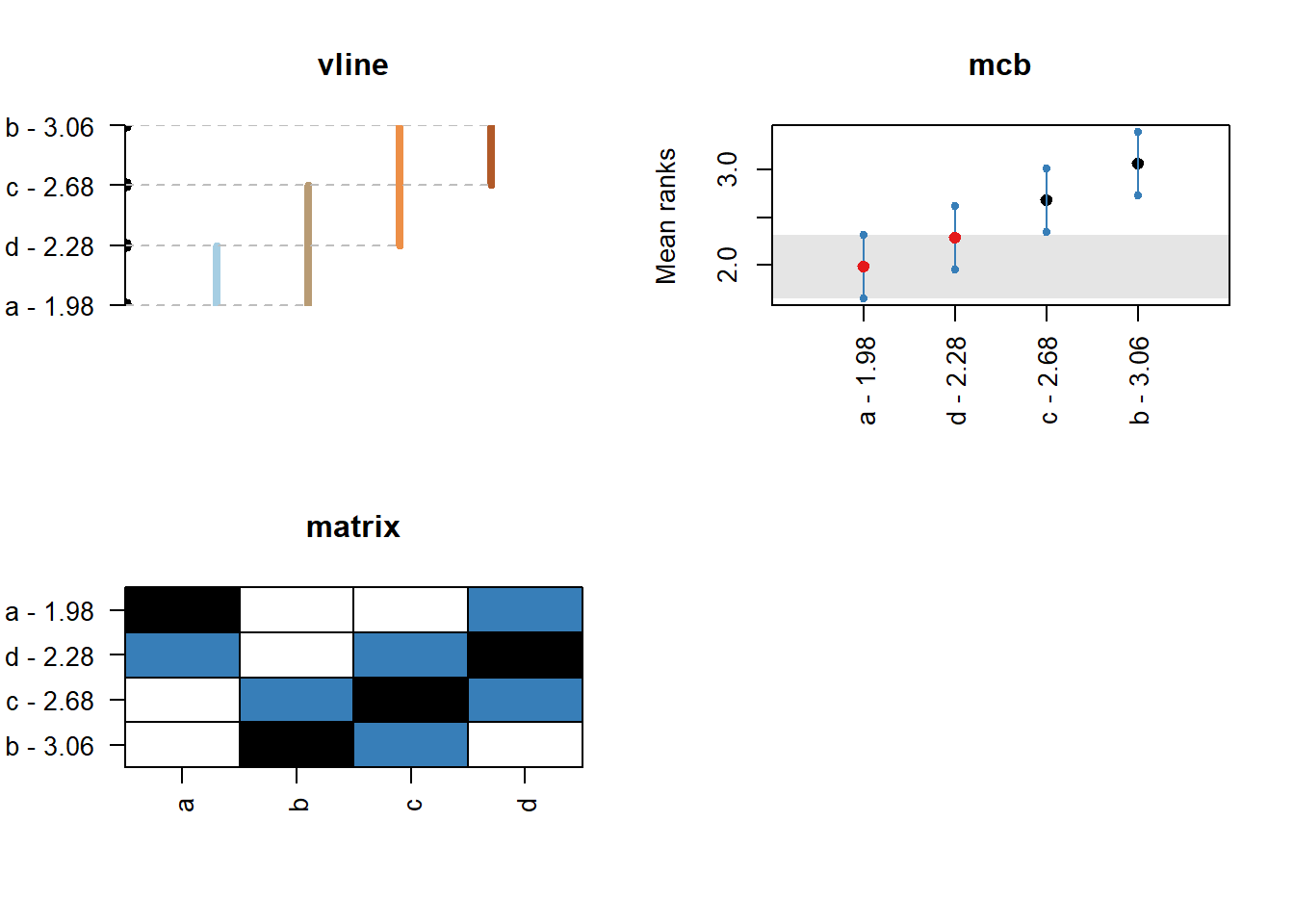
The plot is fairly easy to read. Any for methods that are joined by a horizontal there is no evidence of statistically significant differences. There are multiple lines, as we can start measuring from different methods. The test is simple. For any method that is within plus/minus the critical distance (CD in the plot) from the mean rank (the values next to method names) there is no evidence of differences. The function provides different plot styles, using the argument plottype. This can be used to minic the “multiple comparison with the best” (plottype="mcb" or plottype="vmcb" for vertical alternative), the “line plot” above (plottype="line" or plottype="vline"), a detailed comparison (plottype="matrix") or output no visualisation (plottype="none").

The mcb visualisation shows the performance of the various methods seperately. The dot in the middle is the mean rank of the method and the lines span te critical distance (half above and half below). For any other method that its boundaries are crossed there is no evidence of significant differences. The matrix shows on the vertical axis all methods sorted according to mean rank. On the horizontal axis they are sorted as in the input array. The balck cell is the method from which we measure and in a row (or column) any methods in blue belong to the same group of perofrmance. For example, in all the plots above, method A has no differences from d and c. Method d similarly is grouped together with a and c. When we measure from c, on the other hand, we have no evidence for significant differences from any method. When we measure from b, then both a and d have significant differences. If we are interested in the best performing group then the mcb visualisation is the simplest to consult. Otherwise matrix is the most detailed and line/vline is a compromise between the two.

Forecasting process modelling

Beyond various modelling functions, the package tsutils offers some functions for analysing the forecasting process. More specifically it helps to conduct ABC-XYZ analyses. This is done using the functions abc(), xyz() and abcxyz().

Starting with the ABC part of the analysis, given an array of time series, where each column is a time series, you can use:

x <- abs(matrix(cumsum(rnorm(5400,0,1)),36,150)) # Construct some random data
ABC <- abc(x)
print(ABC)
## ABC analysis
##          Importance %
## A (20%): 39.678
## B (30%): 43.061
## C (50%): 17.261

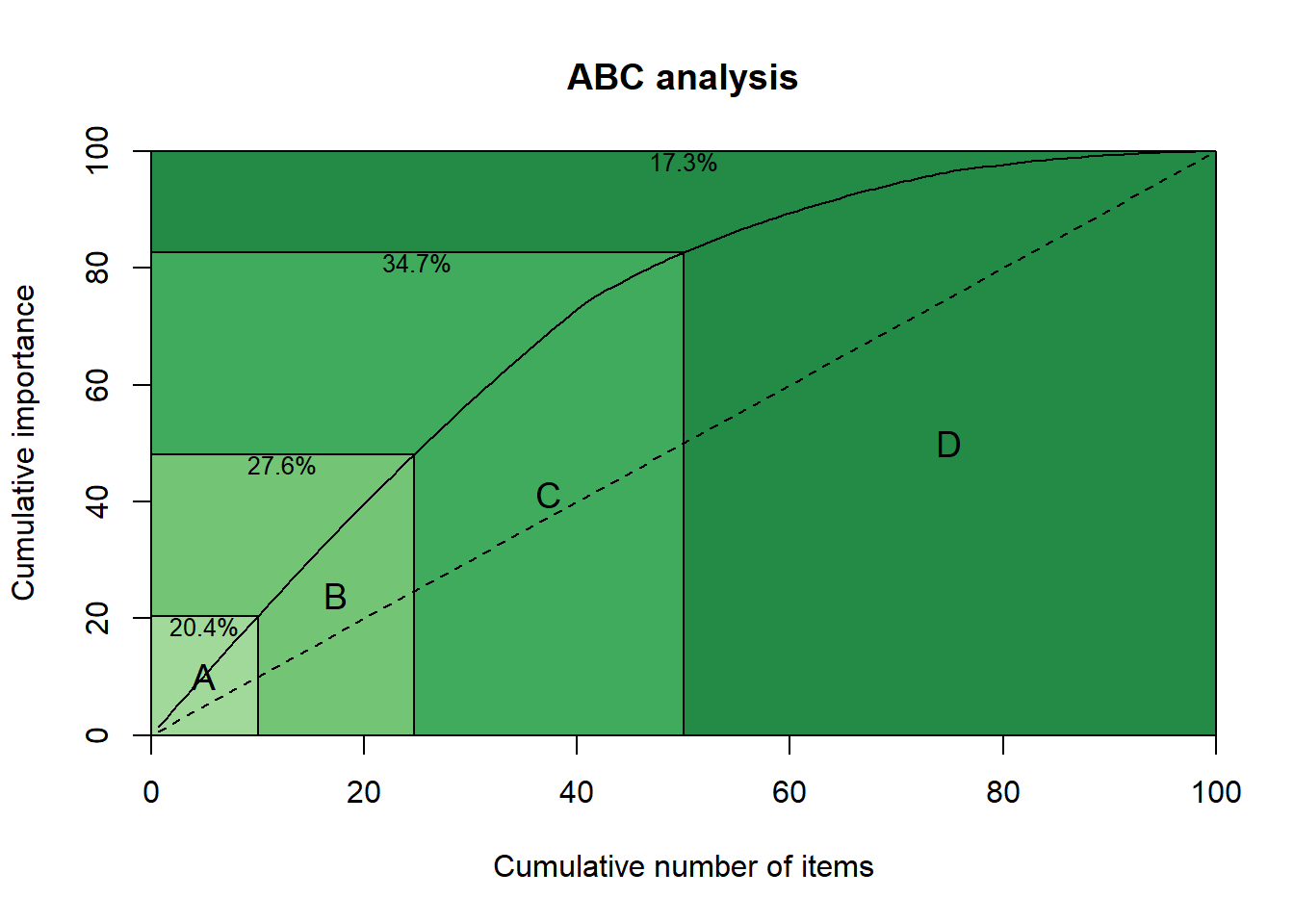
We can also plot the output, providing the concentration in each class.

plot(ABC)

Alternatively, the input can be a vector that contains the importance index for each series. The reader is referred to Ord K., Fildes R., Kourentzes N. (2017) Principles of Business Forecasting, 2e. Wessex Press Publishing Co., p.515-518 for details of how to use the ABC analysis, as well as the XYZ analysis that follows.

The user can set custom percentages for each class, or change the number of classes with the argument prc. For example:

plot(abc(x,prc=c(0.1,0.15,0.25,0.5)))

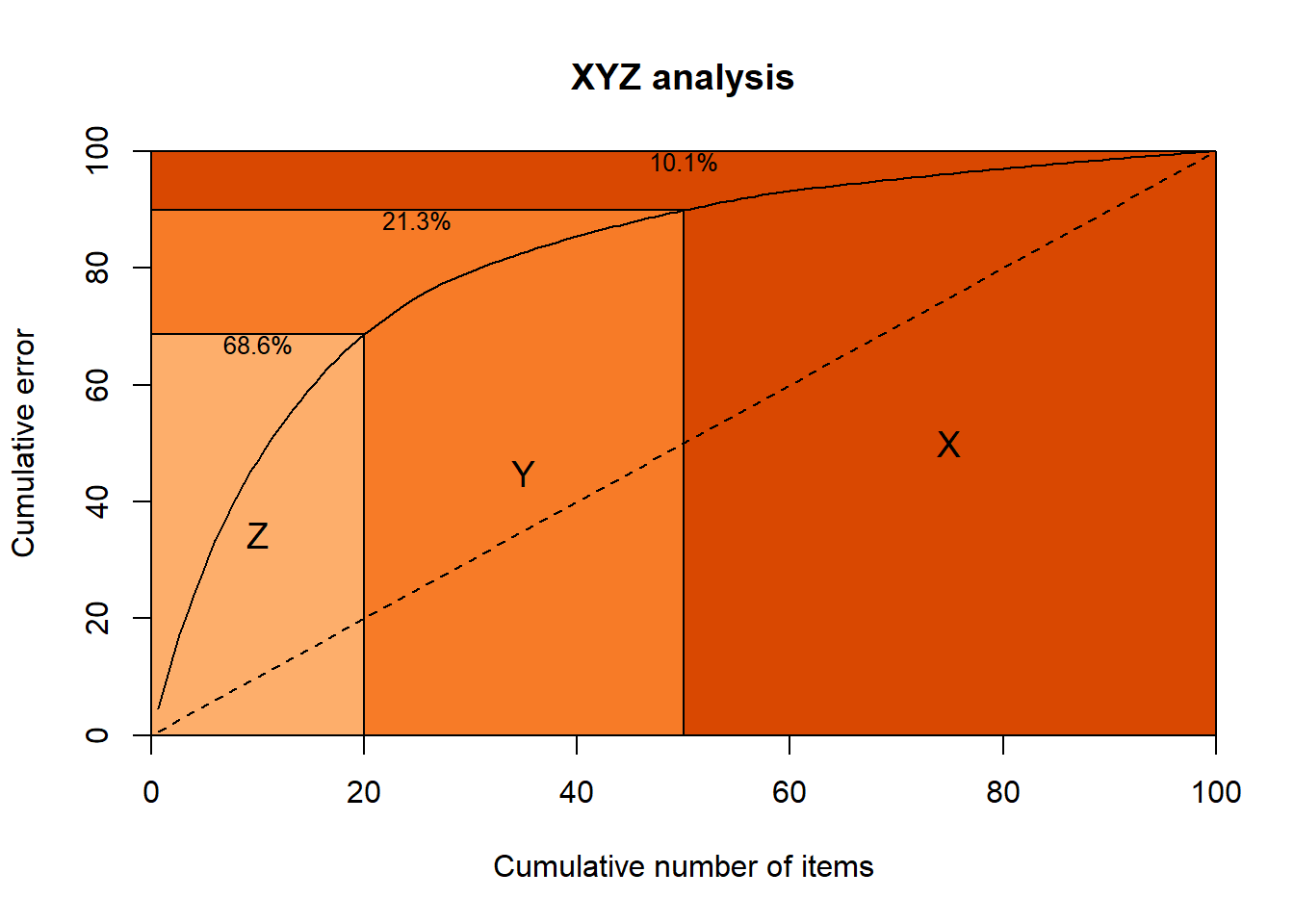
The function xyz() looks at the forecastability side. In addition to the arguments in abc() the user can select the type of forecast used to generate errors (type) and the seasonal periodicity of the series (m). For a discussion see the aforementioned reference and here. By default the naive and seasonal naive methods are used (type="naive"), but the user can opt to rely on exponential smoothing (type="ets"). The option to use the coefficient of variation is available (type="cv"), but I strongly advise against using it (see the previous references).

XYZ <- xyz(x,m=12)
plot(XYZ)

One can combine both analyses with the function abcxyz(). This can also accept a vector of forecast errors (with the argument error) that are distributed to each class of items. This vector must be equal length to the columns used to construct the ABC and XYZ analyses.

abcxyz(ABC,XYZ)

## $class
##    Z  Y  X
## A  0  0 30
## B  0  0 45
## C 30 45  0
## 
## $error
## NULL

Quality of life functions

The package includes some QoL functions. The function geomean() calculates the geometric mean and accepts the same arguments as the mean().

geomean(c(0.5,1,1.5))
## [1] 0.9085603
mean(c(0.5,1,1.5))
## [1] 1

The function leadtrail() can remove leading or trailing zeros or NAs as requested. This is controlled by the argumentsrm, lead and trail.

x <- c(rep(0,2),rnorm(5),rep(0,2))
print(x)
## [1]  0.0000000  0.0000000 -0.9519769 -1.1978381 -0.9596107 -1.6142629
## [7]  0.5855328  0.0000000  0.0000000
leadtrail(x)
## [1] -0.9519769 -1.1978381 -0.9596107 -1.6142629  0.5855328

The function wins() winsorises vectors and accepts the argument p to control how many observations are treated. If p is less than 1, then it is interpretted as a percentage. If it is bigger or equal to 1, then it is treated as number of observations.

x <- sort(round(runif(10)*10))
print(x)
##  [1] 0 1 1 1 3 7 8 8 9 9
wins(x,2)
##  [1] 1 1 1 1 3 7 8 8 8 8
wins(x,0.1)
##  [1] 1 1 1 1 3 7 8 8 9 9

There are two vectorised versions colWins() and rowWins() to speed up calculations for large arrays.

Finally, the function lambdaseq() is meant to be used with LASSO and similar. Given some response target y and regressors x it calculates a sequence of lambdas from the OLS solution to the penalty that removes all regressors from the model. If weighted LASSO will be used, then the argument weigth can beused to account for that. To switch to ridge regression or elastic nets use the argument alpha. How many lambdas are produced (nLambda) and how the lambda decreases (lambdaRatio) can be controlled. The argument standardise preprocess the variables, while the arguement addZeroLamda does as it says and adds the OLS solution lambda in the output vector.

y <- mtcars[,1]
x <- as.matrix(mtcars[,2:11])
lambda <- lambdaseq(x, y)[[1]]
plot(lambda)

This can be directly used with the glmnet package, or with custom shrinkage estimators (the motivation behind building this function!).

library(glmnet)
fit.lasso <- cv.glmnet(x, y, lambda = lambda)

Users of TStools will not find any new functionality in tsutils yet. Under the hood there are various improvements and better documentation. Where necessary, the functions point to useful references and examples. Most importantly, these functions are now in CRAN and safe to use! The plan is to keep expanding tsutils with more functions that graduate from the development TStools.

Happy forecasting!

Incorporating Leading Indicators into your Sales Forecasts

Nikolaos Kourentzes and Yves Sagaert, Foresight: The International Journal of Applied Forecasting, 2018, Issue 48.

This is a modified version of the paper that appears in Foresight issue 48. This provides a simplified version of the modelling methodology described in this paper and applied here and here.

Introduction

Using leading indicators for business forecasting has been relatively rare, partly because our traditional time series methods do not readily allow incorporation of external variables. Nowadays however, we have an abundance of potentially useful indicators, and there is evidence that utilizing relevant ones in a forecasting model can significantly improve forecast accuracy and transparency.

What are leading indicators?

We can define a leading indicator as a numerical variable that contains predictive information for our target variable (e.g., sales) at least as many periods in advance as the forecast lead time. There are several aspects to this definition.

  • First, the indicator should be a hard variable; that is, recorded in a useful way for inputting into a statistical model. This means it should have adequate history and be available at the required frequency, after any appropriate transformations (for example, aggregating data into the desired frequency).
  • Second, the indicator must contain genuine predictive information, not spurious statistical correlation with the target.
  • Third, the indicator must lead the target variable by enough time to be operationally useful. If for example we have a leading indicator that is very informative one month in advance of sales, but we need three-month ahead sales forecast for ordering supplies and materials, this indicator lacks sufficient lead time. (If you are still thinking that it is useful for improving your forecasts, then your forecast lead time is not three but one month – a misjudgment we see all too often!) Note that sometimes it is possible to produce (or source externally) forecasts of indicators, but then poor forecasts here indicators will be damaging! A detailed discussion of the so-called conditional (i.e. using information only up to the time of forecast) and uncoditional forecasting can be found in Principles of Business Forecasting, where alternative forecasting strategies are discussed.

Sources of potential indicators are governmental, banking and private-sector data on macroeconomic, internet search data, social media postings, and an often overlooked source,  the company itself. Strategic, marketing on other company plans, can be useful for constructing leading indicators.

Forecasting with leading indicators

Suppose we have identified a useful leading indicator, how do we use it for forecasting? In the simplest setting, where the target responds linearly to movement in the indicator, we can construct a forecast as Equation (1):

F_{t+h} = M_{t+h} + cX_t (1)

where F_{t+h} is the forecast for period t+h, constructed at period t (now!), M_{t+h} represents the time series components – level, trend, and seasonality – of the target at period t+h exclusive of the effect of the leading indicator, and c is the coefficient on a leading indicator X_t.  In a regression context, M_{t+h} could comprise a constant, a trend variable, a set of seasonal dummies, or lagged values of the target.

Observe that we use index t for X_t, since we require its value to be available at the time we construct the forecast for at least h periods ahead. If the lead were more than h, we would require a forecast for the indicator X. which may introduce more forecast error. Additionally. we might be able to procure forecasts of X from an external source.

Equation (1) can be extended to include many indicators (or lags of the same indicator) in the same fashion as we would include more variables in a multiple regression.

Identifying leading indicators: Lasso regression

So far, we have assumed that we know a priori which indicators are useful. Realistically, this is not the case – so we need an identification strategy for selecting among potentially numerous potential indicators.

Let’s start by restricting our search to macroeconomic leading indicators, which can readily be sourced from a national statistics bureau. There are thousands, maybe tens of thousands of these that could have predictive information. On top of this, we need to consider various lags of the indicators to identify the most informative lead. For example, is it housing sold three or four months in advance that is most informative for our sales? This can quickly bring the number of potential indicators to several hundreds of thousands.

In fact, the number of potential indicator variables k can be larger than the number of available historical observations in our sample n, which makes it impossible to estimate or evaluate a model and rules out classical regression search strategies, such as stepwise regression.

The lasso regression procedure

A promising solution to this problem comes from the technique called Least Absolute Shrinkage and Selection Operator (Lasso) regression. Lasso was introduced by Robert Tibshirani (1996) and since has become a popular tool in many disciplines. (See Ord et al., 2017, section 9.5.2 for a barebone introduction and Hastie et al., 2015 for a thorough discussion) Lasso regression has the major advantage that it can still select and estimate a model when the number of potential indicator variables is greater than the number of historical observations, k>n.

To estimate the model coefficients in standard regression we minimise the Sum of Squared Error (SSE):

SSE=\sum_{t+1}^{n}{(A_t-F_t)^2} (2)

where A_t is the actual observation at time t and F_t is the forecast.  Suppose that the forecast is made up by a constant and k explanatory variables X_{k,t}. For the sake of simplicity, we will drop any lags from the notation, and consider any lagged input as different inputs X. Given that F_t=c_o+\sum_{i=1}^k{c_iX_{i,t}}, (2) becomes:

SSE=\sum_{t=1}^n{(A_t-c_0-\sum_{i=1}^k{c_iX_{i,t}})^2}, (3)

where c_o is the constant and c_i the coefficient on indicator X_{i,t}.

Equation (3) is called the cost function or loss function of the regression. The regression method finds the values for c_o and c_i that minimize the cost function. When a coefficient is insignificantly different from zero, we typically remove that variable from the regression, achieving variable selection.

If k>n, there is no unique solution for the c coefficients, which renders the model useless. This is because we allow full flexibility to the coefficients, which can take on any values. To overcome the problem, we need to impose restrictions on the coefficients. Lasso does so by modifying Equation (3) so that it includes a penalty for model complexity, as measured by the number of regressors in the model with non-zero coefficients. If we think of Equation (3) as “fitting error” we can conceptually write

Error = (Fitting Error) + λ(Penalty). (4)

The reader may realise that Equation (4) appears quite often in time series modelling. Information criteria, such as Akaike’s Information Criterion (AIC) have a similar structure, although a very different underlying logic and derivation. Information criteria seek to mitigate potential overfitting of a model, by imposing penalties/restrictions to the model fit.

In Lasso, penalty is \sum_{i=1}^{k}{|c'_i|}, where c'_i is the coefficient of the standardised variable X_i. The intuition behind this penalty is the following: the more non-zero coefficients (i.e. included variables) the bigger the penalty becomes. Therefore, for equation (4) to be minimised, the penalty must become small as well, which forces variables out of the model. Standardization puts all variables on the same scale, preventing larger-valued variables from dominating just because of their scale rather than their importance in explaining the variation of the target variable.

We can now write the cost function of Lasso as:

 \sum_{t=1}^{n}{(A'_t - \sum_{i=1}^{k}{c'_i X'_{i,t}})^2} + \lambda \sum_{i=1}^{k}{|c'_i|} , (5)

where both actuals and input variables have been standardised, denoted by the prime indicator (‘).

Determining λ

Lasso attempts to minimise Equation (5). If \lambda = 0 Equation (5) reduces to Equation (3), the conventional regression solution. As λ increases above zero, the penalty becomes increasingly dominant, which pushes the c coefficients toward zero (hence the name “shrinkage”). Those variables with zero coefficients will be removed from the model. Intuitively, it is the coefficients on the least important variables that are first pushed to zero, leaving the more important variables in the model to be estimated.  (“Important” does not mean causal, but merely that it explains some of the variance of the historical data.)
So Lasso will select variables— those that remain— and estimate the values of their coefficients. This is true even when k>n.

A “side-effect” of Lasso regression is that we no longer receive statistical-significance values, as we do with conventional regression.  This is so because Equation (5) violates important assumptions underlying the regression model.

Figure 1 illustrates how the coefficients of ten variables – each distinguished by number and color –shrink as  increases (from left to right), until eventually all are removed from the model.

The coefficient values on the very left of the plot are almost identical to the standard regression solution (λ approximatelly zero). This changes as λ increases. For example, imagine a vertical line at λ=0.05. It’s intersection with the lines in the plot reveal the coefficients’ values (on the vertical axis). Some are already equal to zero: those numbered Similarly, if we look at the coefficients for λ=0.15, only one coefficient (number 9) remains non-zero.

Figure 1: Evolution of coefficients for different values of λ. The horizontal lower axis provides the value of λ, where on the left side it starts with λ≈0 and ends with a sufficiently large value to remove all variables. The vertical axis indicates the value of the coefficients. Each variable coefficient is assigned a different colour and are named from 1 to 10.

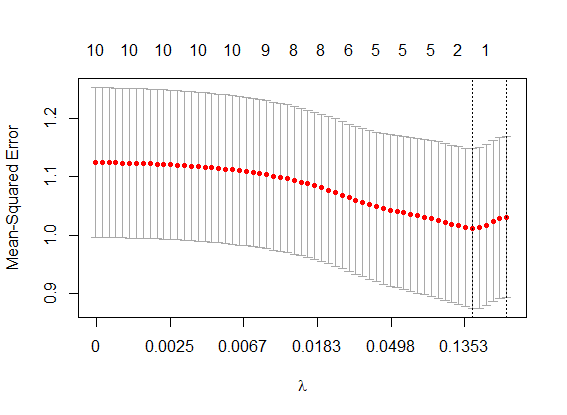
So the choice of value for λ is very important for the performance of Lasso. But how is λ determined?  The standard procedure is through cross-validation: we separate the historical sample into various subsamples, calculating the cross-validated mean squared error across all subsamples. We then look for λ values that minimises this error. Actually, we often chose a slightly larger λ to avoid overfitting to the cross-validation itself. Figure 2 visualises the result of this process. Here, we ran Lasso regressions for various values of λ – plotted on the horizontal axis – and recorded the cross-validated errors. The right-most vertical line indicates the selected (larger) λ, while the vertical line to its left indicates the minimum cross-validated error.

With λ determined, Lasso proceeds to estimate the coefficients of the remaining variables and at the same time drop any variables accordingly.

Figure 2: Cross-validated Mean Squared Error (MSE; red dots) for various values of λ with standard errors (vertical bars) of MSE. Upper horizontal axis indicates the number of non-zero variables. Lower horizontal axis increases at a logarithmic scale.

A case study

Sagaert et al. (2018) showed how Lasso was applied to identify macroeconomic leading indicators for forecasting a tire manufacturer’s sales at a regional level. More specifically, our focus was on forecasting monthly sales for the raw materials in two types of end products for the regions of EU and the US.

The current company practice uses Holt-Winters exponential smoothing to forecast long term sales based on estimates of the trend and seasonal patterns. Management believed however that there are key economic activity indicators that could yield predictive information. For instance, net transported goods can be a good indicator for tire sales. As more goods are transported, more trucks are used, leading eventually to a higher demand for tires. Obviously, there is a lag between the ramp up of the number of transported goods and need for tires. Therefore, the transported good variable could be an useful leading indicator.

But there are possibly numerous other leading indicators for this company. Using publicly available macroeconomic indicators for multiple countries, from the St. Louis Federal Reserve Economic Data, we collected a set of 67,851 potential indicators. These covered a wide variety of categories: consumption, feedstock, financial, housing, import/export, industrial, labour and transportation.

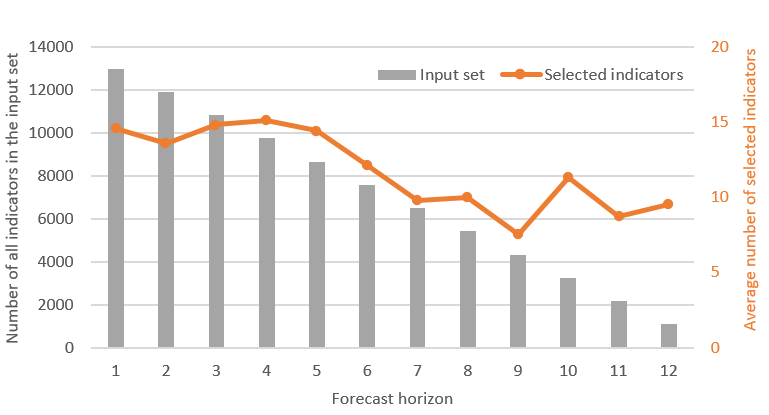
For each indicator, we considered lags from 1 to 12 months, increasing the number of potential indicators to 814,212! At this point we could choose either to build a fully automatic forecasting model, where the selection of leading indicators is based solely on the selection made by the Lasso, or take advantage of managerial knowledge as well.

We interviewed the management team with the aim of identifying relevant subgroups of indicators. This exercise led to a subgroup of 1,082 indicators from the original 67,851. As the objective was to produce forecasts for the next 12 months, a different number of indicators was usable for forecasting 1-step ahead to 12-steps ahead. For one step ahead all 12,984 (all 12 lags) were used. In contrast for forecasting 12-steps ahead, only 1,082 indicators were available (only those with a lag of 12 months, as shorter lagging values would need to be forecasted). Note that we also tried a fully statistical model, built using all indicators with no managerial information. That model performed slightly worse that the one enhanced by expert knowledge and therefore is not discussed hereafter.

Figure 3: For each forecast horizon, a forecasting model is built. The number of indicators in the input set (bars) and the average number of selected indicators (line) are shown for the 12 different Lasso models, one for each forecast horizon.


We built 12 different Lasso regressions —one for each forecast horizon— using a different number of leading indicators, as shown in Figure 3. These regressions were further enhanced by including seasonal effects and potential lags of sales, all of which were selected automatically by the Lasso regression. The final forecasting models included only a selection of the available input variables.

Figure 3 illustrates, for each forecasting horizon, the number of available indicators and the average number of indicators selected. The most informative indicators selected turned out to be: employment in automobile dealerships, the number of national passenger car registrations and the consumer price index for solid fuel prices, all logical choices for forecasting tire sales.

We constructed the Lasso forecasts using the excellent glmnet package for R, whose functions allow us to quickly build Lasso models, to select the optimal value of λ and to generate the forecasts.

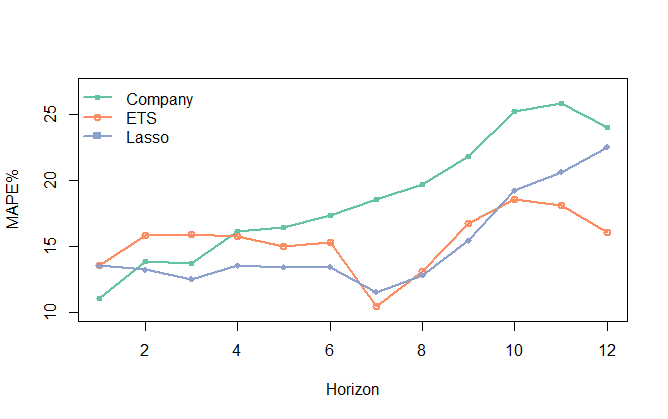
Figure 4 provides the overall Mean Absolute Percentage Error (MAPE) across four time series and up to 12 horizons for tire sales. Company is the current company forecast based on Holt-Winters exponential smoothing. ETS is a more general exponential smoothing approach that considers all versions of level, trend and/or seasonal forms of exponential smoothing. The appropriate form is chosen automatically using the information criterion,AIC.  Lasso is our Lasso regression based on the managerial-selected subset of indicators.

Figure 4: Overall Mean Absolute Percentage Error (MAPE%) for the alternative forecasting methods across the forecast horizon.

The MAPEs are 18.6% for Company, 15.3% for ETS and 15.1% for Lasso.

  • The Company forecast is easily outperformed by ETS, with the exception of very short horizons (1 to 3-steps ahead). So, even without consideration of leading indicators, the company could have improved its forecasting performance by using the exponential smoothing family of models (ETS) that embeds the advancements made in the last 15 years in terms of model forms, parameter estimation, and model selection.
  • Over short to mid-term horizons (up to 6-steps ahead) Lasso offered substantial gains over ETS. At longer horizons Lasso remains competitive to ETS up to 10-steps ahead but fell short at still longer horizons. For short-term forecasts we allowed Lasso to look for short and long leading effects. On the other hand, for long-term forecasts Lasso could look only for long-lead effects, which will be fewer and weaker. For this particular case there was very limited predictive information for leading indicators with leads of 11 or 12 months. At that forecast lead time, information on trend and seasonality was the most important, which was captured effectively by exponential smoothing (ETS).
  • Overall, Lasso proved to be the most accurate forecast method, although the accuracy gain was small compared to ETS. This has significant implications for forecasting practice: ETS contains no leading indicators and can be implemented automatically whereas Lasso considers volumes of data at the planning level.

This approach was also found to translate to inventory benefits. You can find more details here.

Is the use of leading indicators the way forward?

Our study shows that while there is merit in including leading indicators via a Lasso modelling framework for business forecasting, especially with managerial guidance, the practical usefulness of leading indicators is limited to shorter horizons. At very long horizons chances are that there is only univariate information (trend and seasonality) left to model. Appropriately used extrapolative forecasting models remain very important, even for tactical level forecasting.

We certainly now have the computational power to make the use of leading indicators. But at what level of aggregation should they be factored in. In this case study, we modelled aggregate sales series for which macroeconomic effects were expected to be important. At a disaggregate level, how reasonable is it to follow our approach?

Our team has not found evidence that it is worthwhile to build such complex models at the disaggregate level and that univariate forecasts are just as good. This is intuitive, as any macro-effects are lost in the noisy sales of the disaggregate level (for example per SKU sales). Nonetheless, that does not preclude constructing hierarchical forecasts, where at the top levels, macroeconomic indicators can add value, enhancing disaggregate level ETS forecasts.

We used Lasso regression here as our core modelling. Its substantial advantage over other modelling approaches that attempt to condense many potential variables into fewer construct (principal components analysis, or more generally dynamic factor models) is that Lasso outputs the impact of each selected variable and is transparent to the users. It therefore offers greater business insights for managerial adjustments to the forecasts and the eventual acceptance of the forecasts in the organisation.

In other experiments, our team used leading indicators sourced from online search habits of consumers and found that, even if there is a connection, this connection does not manifest itself in the required forecast horizons (Schaer et al., 2018), limiting their value of online indicators for sales forecasting.

So, while there are gains to be made from using leading indicators, we should not be tempted to overly rely on them, when simpler univariate forecasts can do nearly as well. . On the other hand, leading indicators may be able to follow these dynamics and provide crucial forecast accuracy gains. At the end of the day, a model enriched with leading indicators has to make sense!

Incorporating macroeconomic leading indicators in tactical capacity planning

Yves R. Sagaert, Nikolaos Kourentzes, Stijn Du Vuyst, El-Houssaine Aghezzaf and Bram Desmet, 2018, International Journal of Production Economics.

Tactical capacity planning relies on future estimates of demand for the mid- to long-term. On these forecast horizons there is increased uncertainty that the analysts face. To this purpose, we incorporate macroeconomic variables into microeconomic demand forecasting. Forecast accuracy metrics, which are typically used to assess improvements in predictions, are proxies of the real decision associated costs. However, measuring the direct impact on decisions is preferable. In this paper, we examine the capacity planning decision at plant level of a manufacturer. Through an inventory simulation setup, we evaluate the gains of incorporating external macroeconomic information in the forecasts, directly, in terms of achieving target service levels and inventory performance. Furthermore, we provide an approach to indicate capacity alerts, which can serve as input for global capacity pooling decisions. Our work has two main contributions. First, we demonstrate the added value of leading indicator information in forecasting models, when evaluated directly on capacity planning. Second, we provide additional evidence that traditional metrics of forecast accuracy exhibit weak connection with the real decision costs, in particular for capacity planning. We propose a more realistic assessment of the forecast quality by evaluating both the first and second moment of the forecast distribution. We discuss implications for practice, in particular given the typical over-reliance on forecast accuracy metrics for choosing the appropriate forecasting model.

Download paper.

Judgmental Selection of Forecasting Models

Fotios Petropoulos, Nikolaos Kourentzes, Konstantinos Nikolopoulos and Enno Siemsen, 2018, Journal of Operations Management. https://doi.org/10.1016/j.jom.2018.05.005

In this paper, we explored how judgment can be used to improve the selection of a forecasting model. We compared the performance of judgmental model selection against a standard algorithm based on information criteria. We also examined the efficacy of a judgmental model-build approach, in which experts were asked to decide on the existence of the structural components (trend and seasonality) of the time series instead of directly selecting a model from a choice set. Our behavioral study used data from almost 700 participants, including forecasting practitioners. The results from our experiment suggest that selecting models judgmentally results in performance that is on par, if not better, to that of algorithmic selection. Further, judgmental model selection helps to avoid the worst models more frequently compared to algorithmic selection. Finally, a simple combination of the statistical and judgmental selections and judgmental aggregation significantly outperform both statistical and judgmental selections.

Download paper.

Quantile forecast optimal combination to enhance safety stock estimation

Juan R. Trapero, Manuel Cardos and Nikolaos Kourentzes, 2018, International Journal of Forecasting.

The safety stock calculation requires a measure of the forecast error uncertainty. Such errors are usually assumed Gaussian iid (independent, identically distributed). However, deviations from iid deteriorate the supply chain performance. Recent research has shown that, alternatively to theoretical approaches, empirical techniques that do not rely on the aforementioned assumptions, can enhance the safety stock calculation. Particularly, GARCH models cope with time-varying heterocedastic forecast error, and Kernel Density Estimation do not need to rely on a determined distribution. However, if forecast errors are both time-varying heterocedastic and do not follow a determined distribution, the previous approaches are inadequate. To overcome this, we propose an optimal combination of the empirical methods that minimizes the asymmetric piecewise linear loss function, also known as tick loss. The results show that combining quantile forecasts yields safety stocks with a lower cost. The methodology is illustrated with simulations and real data experiments for different lead times.

Download paper.

Another look at forecast selection and combination: evidence from forecast pooling

Nikolaos Kourentzes, Devon K. Barrow and Fotios Petropoulos, 2018, International Journal of Production Economics. https://doi.org/10.1016/j.ijpe.2018.05.019

Forecast selection and combination are regarded as two competing alternatives. In the literature there is substantial evidence that forecast combination is beneficial, in terms of reducing the forecast errors, as well as mitigating modelling uncertainty as we are not forced to choose a single model. However, whether all forecasts to be combined are appropriate, or not, is typically overlooked and various weighting schemes have been proposed to lessen the impact of inappropriate forecasts. We argue that selecting a reasonable pool of forecasts is fundamental in the modelling process and in this context both forecast selection and combination can be seen as two extreme pools of forecasts. We evaluate forecast pooling approaches and find them beneficial in terms of forecast accuracy. We propose a heuristic to automatically identify forecast pools, irrespective of their source or the performance criteria, and demonstrate that in various conditions it performs at least as good as alternative pools that require additional modelling decisions and better than selection or combination.

Download paper.

Empirical safety stock estimation based on kernel and GARCH models

Juan R. Trapero, Manuel Cardos, and Nikolaos Kourentzes, 2018, Omega. https://doi.org/10.1016/j.omega.2018.05.004

Supply chain risk management has drawn the attention of practitioners and academics alike. One source of risk is demand uncertainty. Demand forecasting and safety stock levels are employed to address this risk. Most previous work has focused on point demand forecasting, given that the forecast errors satisfy the typical normal i.i.d. assumption. However, the real demand for products is difficult to forecast accurately, which means that—at minimum—the i.i.d. assumption should be questioned. This work analyzes the effects of possible deviations from the i.i.d. assumption and proposes empirical methods based on kernel density estimation (non-parametric) and GARCH(1,1) models (parametric), among others, for computing the safety stock levels. The results suggest that for shorter lead times, the normality deviation is more important, and kernel density estimation is most suitable. By contrast, for longer lead times, GARCH models are more appropriate because the autocorrelation of the variance of the forecast errors is the most important deviation. In fact, even when no autocorrelation is present in the original demand, such autocorrelation can be present as a consequence of the overlapping process used to compute the lead time forecasts and the uncertainties arising in the estimation of the parameters of the forecasting model. Improvements are shown in terms of cycle service level, inventory investment and backorder volume. Simulations and real demand data from a manufacturer are used to illustrate our methodology.

Download paper.

ISF2018 Presentation: Beyond summary performance metrics for forecast selection and combination

Nikolaos Kourentzes, Ivan Svetunkov and Stephan Kolassa, ISF2018, 20th June 2018.

In doing forecast selection or combination we typically rely on some performance metric. For example, that could be Akaike Information Criterion or some cross-validated accuracy measure. From these we can either pick the top performer, or construct combination weights. There is ample empirical evidence demonstrating the appropriateness of such metrics, both in terms of resulting forecast accuracy and automation of the forecasting process. Yet, these performance metrics are summary statistics, that do not reflect higher moments of the metrics. This poses similar issues to analysing only point forecasts to assess the risks associated with a prediction, instead of looking at prediction intervals as well. Looking at summary statistics does not reflect the uncertainty in the ranking of alternative forecasts, and therefore the uncertainty in selection and combination of forecasts. We propose a modification in the use of the AIC and an associated procedure for selecting a single forecast or constructing combination weights that aims to go beyond the use of summary statistics to characterise each forecast. We demonstrate that our approach does not require an arbitrary dichotomy between forecast selection, combination or pooling, and switches appropriately depending on the time series on hand and the pool of forecasts considered. The performance of the approach is evaluated empirically on a large number of real time series from various sources.

Download slides.